英会話練習のためのプログラムを作成してみる その1(Node-RED、Python)
 管理人
管理人はじめに
つい最近、国際学会に参加することがありました。英語の発表をするだけなら練習すればいいのですが、質疑応答は即座に英語で回答できるか不安だったので、英会話練習のためのプログラムを作成してみました。
これまで試していた音声認識、LLMとの対話、音声合成などを組み合わせました。実際に試していると、咄嗟に言いたいことが英語で言えなくて難しかったです。
▼ちなみに英語発音の訛りを判定できるサイトでは、私の発音は100%日本人として判定されました。
https://start.boldvoice.com/accent-oracle
▼以前の記事はこちら
Ollamaを使ってみる その1(Gemma2、Node-RED)
はじめに 今回はローカル環境でLLMを利用できるOllamaを使ってみました。様々な言語モデルをインストールして、文章を生成することができます。 これまで音声の文字起…
 趣味的ロボット研究所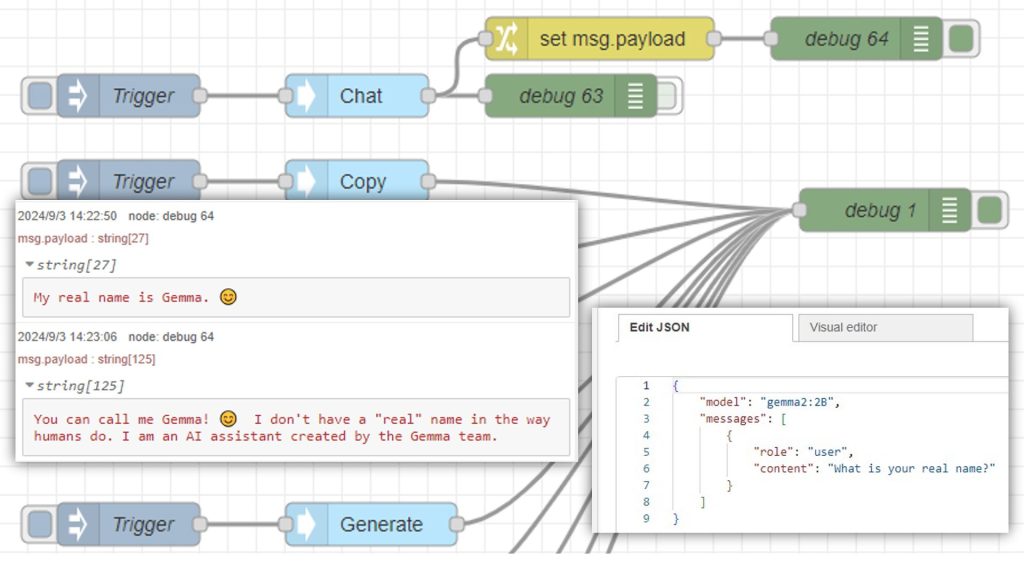
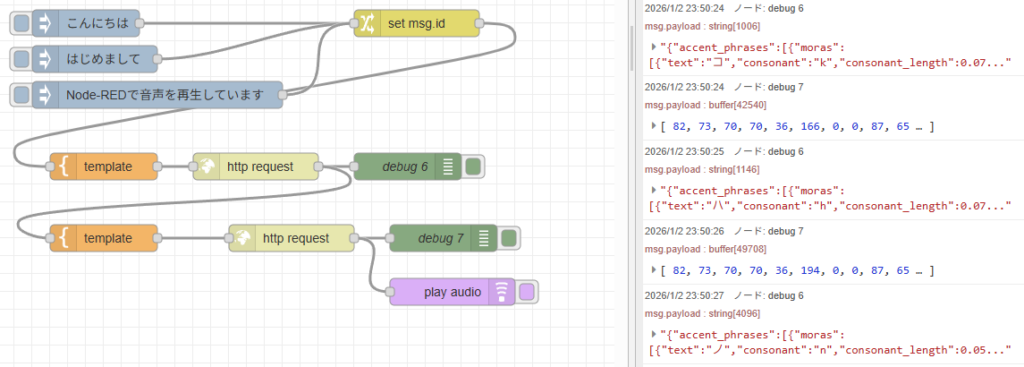
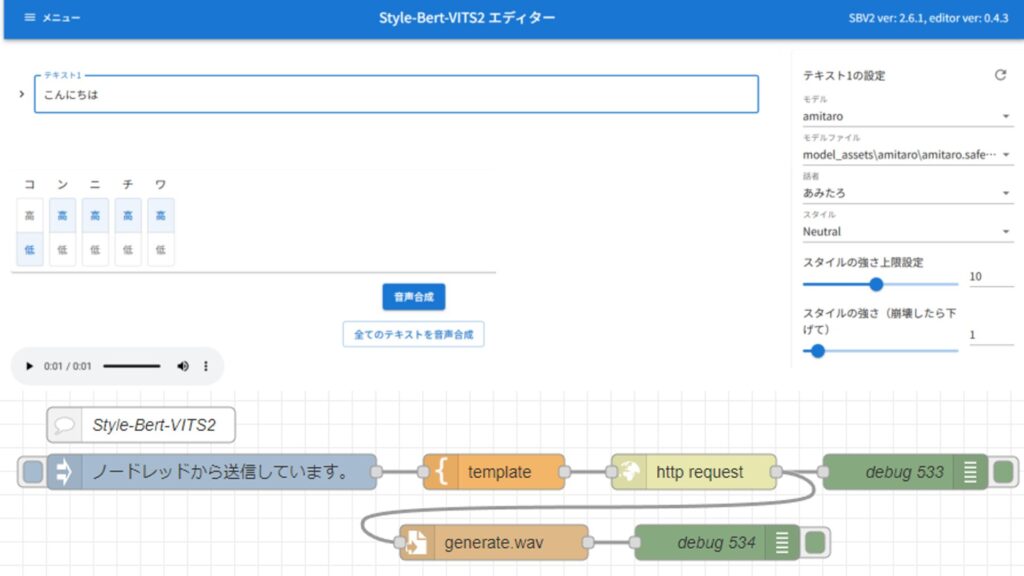
Style-Bert-VITS2を使ってみる(Text to Speech、Node-RED)
はじめに 今回はStyle-Bert-VITS2を使ったText to Speech (TTS)を試してみました。 TTS系のソフトウェアで、日本語に対応していて高速なものを探していたのですが、知…
フローを作成する
Node-REDでAI関連のツールを実行するにあたって、Pythonを利用しています。私が開発したpython-venvノードでは、Node-REDでPythonの仮想環境を利用して、パッケージをインストールしたり、コードを実行したりできます。
▼python-venvノードについては、度々紹介しています。
Node-REDのノードを作成してみる その1(python-venv)
はじめに 今回はNode-REDでPythonの仮想環境を利用できるノードを作成してみました。 これまでNode-RED MCU用のノードを作成したことはありますが、Node-RED用は2つ目…

https://qiita.com/background/items/d2e05e8d85427761a609
https://flows.nodered.org/node/@background404/node-red-contrib-python-venv
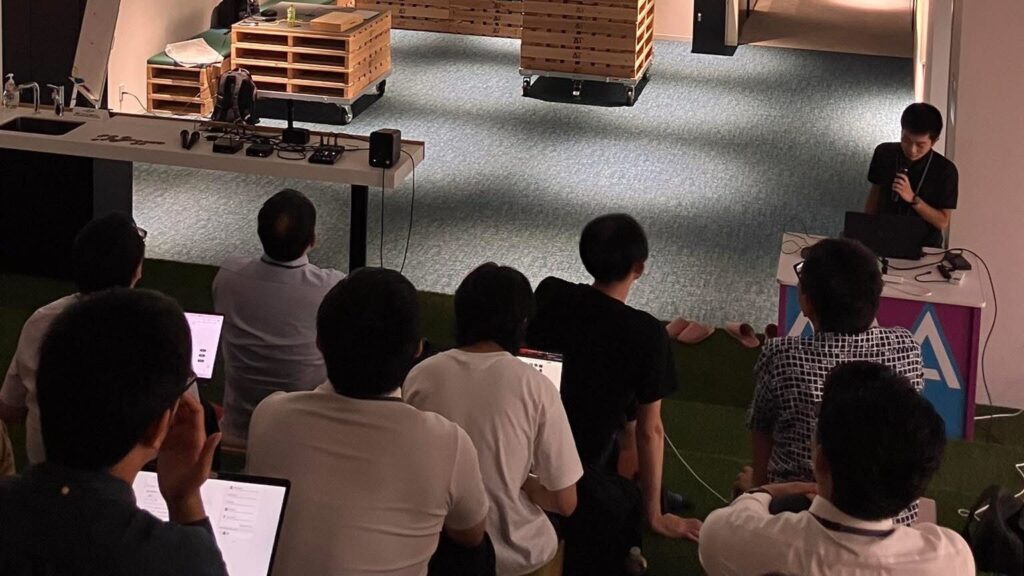
Node-RED Con Nagoya 2025に登壇しました!
はじめに 今回は10/17に行われたNode-RED Con Nagoya 2025の振り返りです。1年に1回行われている、Node-REDのカンファレンスにはじめて登壇しました。 これまでNode-R…
Node-REDのpython-venvノードを利用した音声翻訳のフローを過去に作成して公開していました。
▼こちらのページです。
https://github.com/404background/node-red-contrib-python-venv/discussions/48
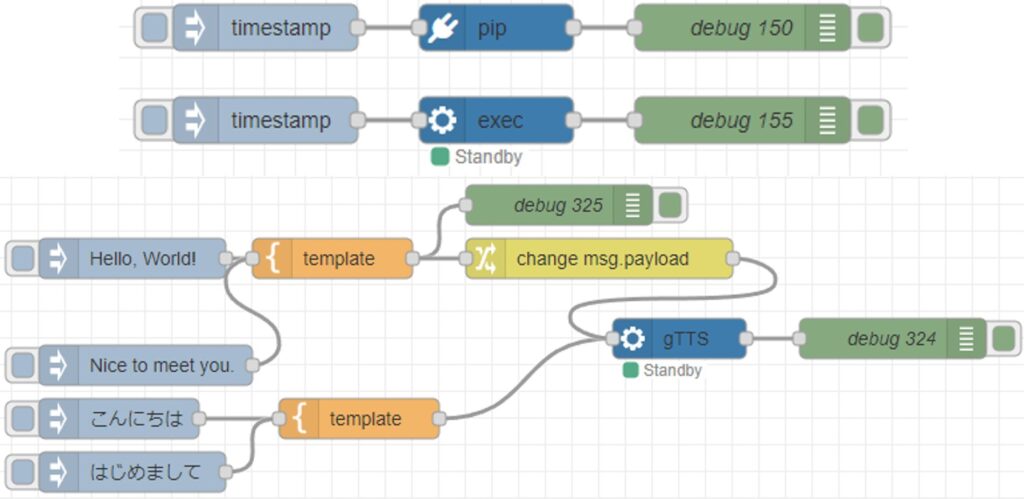
▼以下のフローを作成していました。

各ノードで録音、音声認識、翻訳、音声合成、再生の処理を行っていました。ノード毎に処理を分けているので、機能ごとにノードを変更すれば簡単に組み替えることができます。このフローをベースに作成していきます。
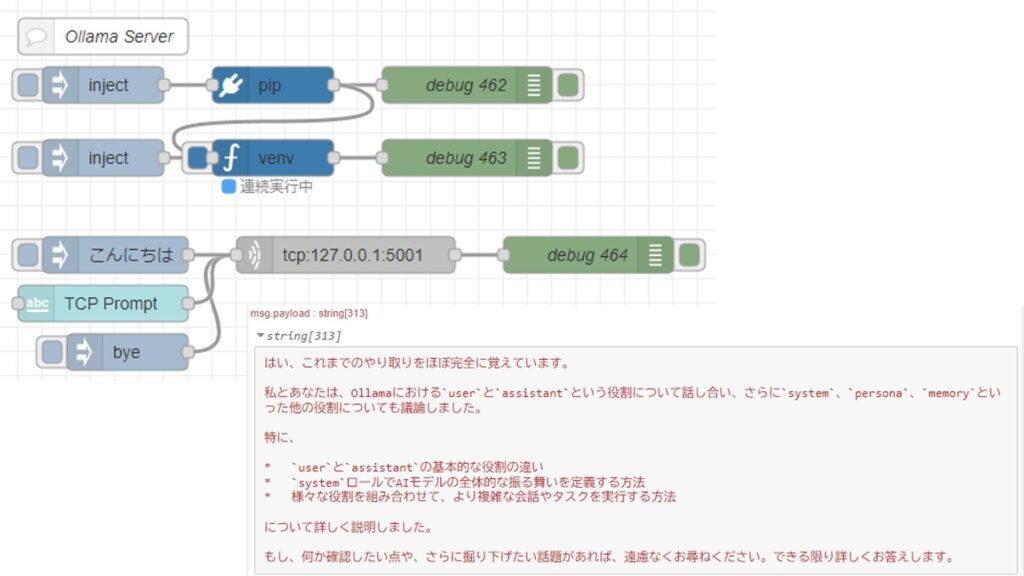
Ollamaを利用したLLMとの対話により会話できるようにするのですが、Node-REDでのOllamaとのやり取りは検証済みです。個人的にはgemma3:4bが処理が速く、日本語の応答に違和感が無いという理由でよく使っています。
▼以下の記事で試していました。
Ollamaを使ってみる その3(Pythonでの利用、Node-RED、Gemma3:4B)
はじめに 今回はPythonでのOllamaの利用方法を確認して、サーバーとして実行できるようにしてみました。 これまでOllamaを利用するときは、Node-REDのollamaノードを…
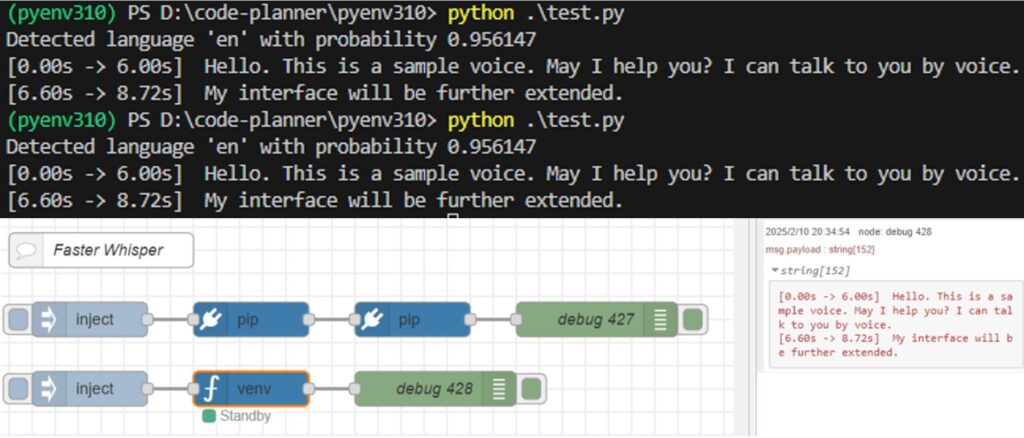
音声認識には以前と同じくFaster Whisperを用いました。
▼こちらの記事で試していました。以前は日本語でしたが、今回は英語が対象です。
Faster Whisperを使ってみる(GPUでの実行、Python、Node-RED)
はじめに 今回はFaster Whisperを利用して文字起こしをしてみました。 Open AIのWhisperによる文字起こしよりも高速ということで試したことがあったのですが、以前はC…
英語の音声合成も以前と同じくgTTSを使うことにしました。レスポンスが速いです。
▼以下の記事で試していました。
PythonでgTTSを使ってみる(音声合成、Node-RED)
はじめに 今回はPythonでgTTS(Google Text-to-Speech)を使ってみました。 以前VoiceVoxも使ったことがあるのですが、英語も話すことができて、ローカル環境での音声の…
これまで検証を行っていたときのフローを組み合わせて、英会話用のフローを作成しました。
▼こちらのフローです。
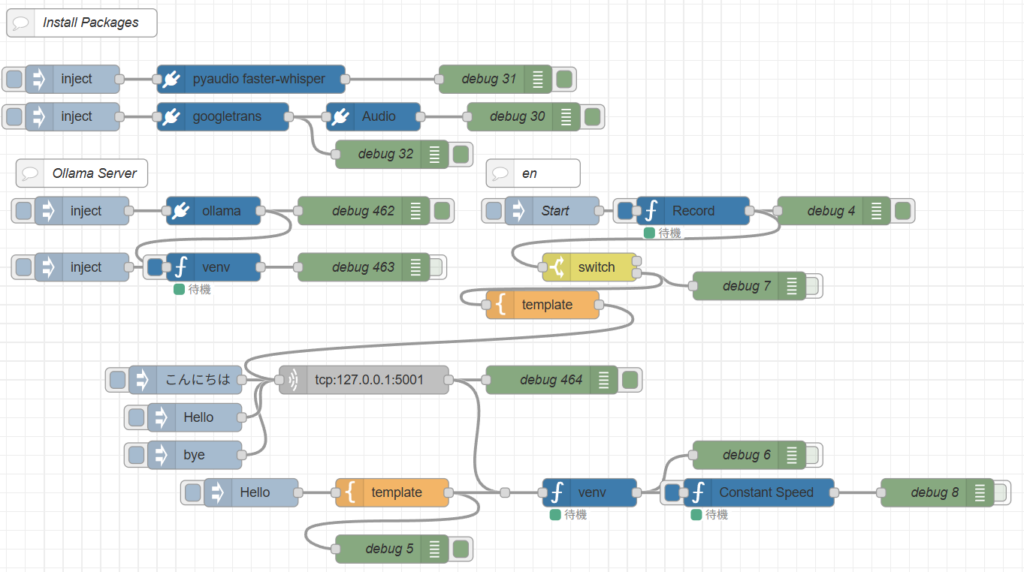
[{"id":"aaf1d6d449c94b50","type":"venv","z":"3852c69e65b57289","venvconfig":"9f6da0060d06a240","name":"","code":"import socket\nimport ollama\nimport threading\nimport sys\n\nHOST = '127.0.0.1'\nPORT = 5001\nMAX_HISTORY = 20\nchat_history = []\nserver_socket = None\nrunning = True\n\ndef chat_with_ollama(user_input):\n global chat_history\n \n # 履歴の長さを制限\n if len(chat_history) >= MAX_HISTORY:\n chat_history.pop(0)\n\n chat_history.append({'role': 'user', 'content': user_input})\n \n response = ollama.chat(model='gemma3:4b', messages=chat_history)\n chat_reply = response['message']['content']\n \n chat_history.append({'role': 'assistant', 'content': chat_reply})\n print(chat_history)\n return chat_reply\n\ndef handle_client(client_socket):\n \"\"\" クライアントごとの処理 \"\"\"\n global running\n with client_socket:\n print(f\"Client connected: {client_socket.getpeername()}\")\n while True:\n try:\n data = client_socket.recv(1024).decode().strip()\n if not data:\n break\n if data.lower() == \"bye\":\n print(\"Received 'bye', shutting down server...\")\n client_socket.sendall(\"Ollama Shutdown\".encode())\n running = False # サーバーの実行を停止\n break\n\n response = chat_with_ollama(data)\n client_socket.sendall(response.encode())\n except (ConnectionResetError, BrokenPipeError):\n break\n print(\"Client disconnected.\")\n\ndef server_thread():\n \"\"\" サーバーをスレッドで実行 \"\"\"\n global server_socket, running\n\n server_socket = socket.socket(socket.AF_INET, socket.SOCK_STREAM)\n server_socket.setsockopt(socket.SOL_SOCKET, socket.SO_REUSEADDR, 1)\n server_socket.bind((HOST, PORT))\n server_socket.listen()\n server_socket.settimeout(1.0) # 1秒ごとに `Ctrl+C` チェック\n\n print(f\"Listening on {HOST}:{PORT}...\")\n\n try:\n while running:\n try:\n client_socket, addr = server_socket.accept()\n client_thread = threading.Thread(target=handle_client, args=(client_socket,))\n client_thread.start()\n except socket.timeout:\n continue # タイムアウトしてもループを継続\n except Exception as e:\n print(f\"Server error: {e}\")\n finally:\n server_socket.close()\n print(\"Server shut down.\")\n\ndef main():\n global running\n server = threading.Thread(target=server_thread)\n server.start()\n\n try:\n while running:\n pass # メインスレッドを維持して `Ctrl+C` を待つ\n except KeyboardInterrupt:\n print(\"\\nShutting down server...\")\n running = False # サーバーの実行を停止\n server.join() # スレッドを待機\n sys.exit(0)\n\nif __name__ == \"__main__\":\n main()\n","continuous":true,"x":700,"y":1120,"wires":[["bfe2ca92d58b4aab"]]},{"id":"ab187d6e8aa28dc5","type":"pip","z":"3852c69e65b57289","venvconfig":"9f6da0060d06a240","name":"ollama","arg":"ollama","action":"install","tail":false,"x":700,"y":1060,"wires":[["96f1feaa88df4420","aaf1d6d449c94b50"]]},{"id":"aba8c6f5265613f1","type":"inject","z":"3852c69e65b57289","name":"","props":[],"repeat":"","crontab":"","once":false,"onceDelay":0.1,"topic":"","x":560,"y":1060,"wires":[["ab187d6e8aa28dc5"]]},{"id":"96f1feaa88df4420","type":"debug","z":"3852c69e65b57289","name":"debug 462","active":true,"tosidebar":true,"console":false,"tostatus":false,"complete":"false","statusVal":"","statusType":"auto","x":860,"y":1060,"wires":[]},{"id":"772bbe230ffb89db","type":"inject","z":"3852c69e65b57289","name":"","props":[],"repeat":"","crontab":"","once":false,"onceDelay":0.1,"topic":"","x":560,"y":1120,"wires":[["aaf1d6d449c94b50"]]},{"id":"bfe2ca92d58b4aab","type":"debug","z":"3852c69e65b57289","name":"debug 463","active":false,"tosidebar":true,"console":false,"tostatus":false,"complete":"false","statusVal":"","statusType":"auto","x":860,"y":1120,"wires":[]},{"id":"a289d789c6353cb4","type":"comment","z":"3852c69e65b57289","name":"Ollama Server","info":"","x":560,"y":1020,"wires":[]},{"id":"7dac2b20f9756edb","type":"inject","z":"3852c69e65b57289","name":"","props":[{"p":"payload"}],"repeat":"","crontab":"","once":false,"onceDelay":0.1,"topic":"","payload":"bye","payloadType":"str","x":680,"y":1320,"wires":[["cffc835148198023"]]},{"id":"e5b3b8a4b272df67","type":"inject","z":"3852c69e65b57289","name":"","props":[{"p":"payload"}],"repeat":"","crontab":"","once":false,"onceDelay":0.1,"topic":"","payload":"こんにちは","payloadType":"str","x":670,"y":1240,"wires":[["cffc835148198023"]]},{"id":"cffc835148198023","type":"tcp request","z":"3852c69e65b57289","name":"","server":"127.0.0.1","port":"5001","out":"time","ret":"string","splitc":"0","newline":"","trim":false,"tls":"","x":860,"y":1240,"wires":[["3004d51474ae3ac7","37a414a63432014a"]]},{"id":"3004d51474ae3ac7","type":"debug","z":"3852c69e65b57289","name":"debug 464","active":true,"tosidebar":true,"console":false,"tostatus":false,"complete":"false","statusVal":"","statusType":"auto","x":1060,"y":1240,"wires":[]},{"id":"6add9796c6edf4ff","type":"inject","z":"3852c69e65b57289","name":"Start","props":[],"repeat":"","crontab":"","once":false,"onceDelay":0.1,"topic":"","x":1060,"y":1060,"wires":[["20f2c93987dbd35f"]]},{"id":"75f195108c82622d","type":"debug","z":"3852c69e65b57289","name":"debug 4","active":true,"tosidebar":true,"console":false,"tostatus":false,"complete":"false","statusVal":"","statusType":"auto","x":1360,"y":1060,"wires":[]},{"id":"20f2c93987dbd35f","type":"venv","z":"3852c69e65b57289","venvconfig":"9f6da0060d06a240","name":"Record","code":"import pyaudio\nimport numpy as np\nfrom faster_whisper import WhisperModel\n\n# ==============================\n# ユーザー設定\n# ==============================\n\nMIC_DEVICE_INDEX = 2 # ★★★ ここでマイクのIndexを指定 ★★★\nMODEL_SIZE = \"medium\" # base\n\n# 音声設定\nFORMAT = pyaudio.paInt16\nCHANNELS = 1\nRATE = 16000\nCHUNK = 1024\n\nSILENCE_LIMIT = 2.0 # 無音判定時間(秒)\nNOISE_ESTIMATION_TIME = 1.0 # 環境ノイズ測定時間(秒)\nNOISE_THRESHOLD_MULT = 3.0 # ノイズ倍率\n\n# ==============================\n# Whisperモデル初期化\n# ==============================\n\ntry:\n model = WhisperModel(MODEL_SIZE, device=\"cuda\", compute_type=\"float16\")\n print(\"[DEBUG] GPU (CUDA) モードで起動しました。\")\nexcept Exception as e:\n print(f\"[DEBUG] GPU起動失敗 ({e}) → CPUモード\")\n model = WhisperModel(MODEL_SIZE, device=\"cpu\", compute_type=\"int8\")\n\n# ==============================\n# Audio 初期化\n# ==============================\n\naudio = pyaudio.PyAudio()\n\nprint(f\"[DEBUG] 使用するマイクIndex: {MIC_DEVICE_INDEX}\")\ninfo = audio.get_device_info_by_index(MIC_DEVICE_INDEX)\nprint(f\"[DEBUG] マイク名: {info['name']}\")\n\nstream = audio.open(\n format=FORMAT,\n channels=CHANNELS,\n rate=RATE,\n input=True,\n input_device_index=MIC_DEVICE_INDEX,\n frames_per_buffer=CHUNK\n)\n\n# ==============================\n# 状態変数\n# ==============================\n\nSILENCE_THRESHOLD = None\nnoise_rms_values = []\nelapsed_noise_time = 0.0\n\nall_frames = []\nis_speaking = False\nsilent_duration = 0.0\n\nprint(\"[DEBUG] 環境ノイズ測定開始...\")\n\n# ==============================\n# メインループ\n# ==============================\n\ntry:\n while True:\n data = stream.read(CHUNK, exception_on_overflow=False)\n audio_chunk = np.frombuffer(data, dtype=np.int16).astype(np.float32) / 32768.0\n rms = np.sqrt(np.mean(audio_chunk ** 2))\n chunk_time = CHUNK / RATE\n\n # ------------------------------\n # ノイズフロア測定フェーズ\n # ------------------------------\n if SILENCE_THRESHOLD is None:\n noise_rms_values.append(rms)\n elapsed_noise_time += chunk_time\n\n if elapsed_noise_time >= NOISE_ESTIMATION_TIME:\n noise_floor = float(np.mean(noise_rms_values))\n SILENCE_THRESHOLD = noise_floor * NOISE_THRESHOLD_MULT\n print(f\"[DEBUG] ノイズフロア: {noise_floor:.6f}\")\n print(f\"[DEBUG] ノイズ閾値設定: {SILENCE_THRESHOLD:.6f}\")\n print(\"[DEBUG] 音声認識待機中...\")\n continue\n\n # ------------------------------\n # 発話検出\n # ------------------------------\n if rms > SILENCE_THRESHOLD:\n if not is_speaking:\n is_speaking = True\n # print(\"[DEBUG] 録音開始\")\n\n all_frames.append(data)\n silent_duration = 0.0\n\n else:\n if is_speaking:\n all_frames.append(data)\n silent_duration += chunk_time\n\n if silent_duration >= SILENCE_LIMIT:\n # ------------------------------\n # Whisper 推論\n # ------------------------------\n audio_data = np.frombuffer(\n b''.join(all_frames), dtype=np.int16\n ).astype(np.float32) / 32768.0\n\n segments, info = model.transcribe(\n audio_data,\n beam_size=5,\n language=\"en\",\n vad_filter=True\n )\n\n text = \"\".join(seg.text for seg in segments).strip()\n if text:\n print(text)\n\n # リセット\n all_frames = []\n is_speaking = False\n silent_duration = 0.0\n\nexcept KeyboardInterrupt:\n print(\"\\n[DEBUG] 終了します\")\n\nfinally:\n stream.stop_stream()\n stream.close()\n audio.terminate()\n","continuous":true,"x":1210,"y":1060,"wires":[["75f195108c82622d","9dedaffe03177259"]]},{"id":"b70eebee1b0f8f26","type":"comment","z":"3852c69e65b57289","name":"en","info":"","x":1040,"y":1020,"wires":[]},{"id":"3ee9600cc276eca6","type":"inject","z":"3852c69e65b57289","name":"","props":[{"p":"payload"}],"repeat":"","crontab":"","once":false,"onceDelay":0.1,"topic":"","payload":"Hello","payloadType":"str","x":680,"y":1280,"wires":[["cffc835148198023"]]},{"id":"c1a45a7468958355","type":"inject","z":"3852c69e65b57289","name":"","props":[{"p":"payload"}],"repeat":"","crontab":"","once":false,"onceDelay":0.1,"topic":"","payload":"Hello","payloadType":"str","x":740,"y":1360,"wires":[["3a9f8f31fa8361ff"]]},{"id":"3a9f8f31fa8361ff","type":"template","z":"3852c69e65b57289","name":"","field":"payload","fieldType":"msg","format":"handlebars","syntax":"mustache","template":"{{payload}} --output voice_en.mp3 --lang en","output":"str","x":890,"y":1360,"wires":[["1d08214cc1cf0138","37a414a63432014a"]]},{"id":"1d08214cc1cf0138","type":"debug","z":"3852c69e65b57289","name":"debug 5","active":true,"tosidebar":true,"console":false,"tostatus":false,"complete":"false","statusVal":"","statusType":"auto","x":890,"y":1420,"wires":[]},{"id":"5cde7328496c37d1","type":"venv","z":"3852c69e65b57289","venvconfig":"9f6da0060d06a240","name":"","code":"from gtts import gTTS\n\n# 音声化したいテキスト\ntext = msg['payload']\n\n# gTTSの設定\ntts = gTTS(text=text, lang='en')\n\n# 指定されたファイル名で保存\nfilename = \"voice_en.mp3\"\ntts.save(filename)\n","continuous":false,"x":1100,"y":1360,"wires":[["a4fb54aa5a71adda","541fec172c0f1263"]]},{"id":"a4fb54aa5a71adda","type":"debug","z":"3852c69e65b57289","name":"debug 6","active":false,"tosidebar":true,"console":false,"tostatus":false,"complete":"false","statusVal":"","statusType":"auto","x":1270,"y":1320,"wires":[]},{"id":"9dedaffe03177259","type":"switch","z":"3852c69e65b57289","name":"","property":"payload","propertyType":"msg","rules":[{"t":"cont","v":"[DEBUG]","vt":"str"},{"t":"else"}],"checkall":"true","repair":false,"outputs":2,"x":1100,"y":1120,"wires":[[],["a49256832d2fbc9f","a4e5925b81f71973"]]},{"id":"a49256832d2fbc9f","type":"debug","z":"3852c69e65b57289","name":"debug 7","active":false,"tosidebar":true,"console":false,"tostatus":false,"complete":"false","statusVal":"","statusType":"auto","x":1270,"y":1140,"wires":[]},{"id":"a4e5925b81f71973","type":"template","z":"3852c69e65b57289","name":"","field":"payload","fieldType":"msg","format":"handlebars","syntax":"mustache","template":"You are system chat assistant.\nDo not use special character.\nAnswer short conversations.\n\nUser:{{payload}}","output":"str","x":1050,"y":1160,"wires":[["cffc835148198023"]]},{"id":"c8a20dcb7dae1a9a","type":"debug","z":"3852c69e65b57289","name":"debug 8","active":false,"tosidebar":true,"console":false,"tostatus":false,"complete":"false","statusVal":"","statusType":"auto","x":1470,"y":1360,"wires":[]},{"id":"541fec172c0f1263","type":"venv","z":"3852c69e65b57289","venvconfig":"9f6da0060d06a240","name":"Constant Speed","code":"import os\nimport sys\nimport warnings\n\n# UserWarningを抑制(pygameのインポート前に実行)\nwarnings.filterwarnings(\"ignore\", category=UserWarning, module=\"pygame.pkgdata\")\n\nimport pygame\n\npygame.mixer.init()\npygame.mixer.music.load('voice_en.mp3')\npygame.mixer.music.play()\n\nwhile pygame.mixer.music.get_busy():\n pygame.time.Clock().tick(10)","continuous":true,"x":1280,"y":1360,"wires":[["c8a20dcb7dae1a9a"]]},{"id":"feebc8ed2dab31df","type":"inject","z":"3852c69e65b57289","name":"","props":[],"repeat":"","crontab":"","once":false,"onceDelay":0.1,"topic":"","x":550,"y":960,"wires":[["116bc5d1c1f2eac8"]]},{"id":"4a532c2b85883bfc","type":"debug","z":"3852c69e65b57289","name":"debug 30","active":true,"tosidebar":true,"console":false,"tostatus":false,"complete":"false","statusVal":"","statusType":"auto","x":1030,"y":960,"wires":[]},{"id":"98464f0e6daace38","type":"debug","z":"3852c69e65b57289","name":"debug 31","active":true,"tosidebar":true,"console":false,"tostatus":false,"complete":"false","statusVal":"","statusType":"auto","x":1000,"y":920,"wires":[]},{"id":"91c2295a08dc2eae","type":"inject","z":"3852c69e65b57289","name":"","props":[],"repeat":"","crontab":"","once":false,"onceDelay":0.1,"topic":"","x":550,"y":920,"wires":[["186c305dc3f80c02"]]},{"id":"ebc6fc3958c3902e","type":"comment","z":"3852c69e65b57289","name":"Install Packages","info":"","x":560,"y":860,"wires":[]},{"id":"e314fd8f1fa97209","type":"debug","z":"3852c69e65b57289","name":"debug 32","active":true,"tosidebar":true,"console":false,"tostatus":false,"complete":"false","statusVal":"","statusType":"auto","x":890,"y":1000,"wires":[]},{"id":"116bc5d1c1f2eac8","type":"pip","z":"3852c69e65b57289","venvconfig":"9f6da0060d06a240","name":"googletrans","arg":"googletrans","action":"install","tail":false,"x":710,"y":960,"wires":[["e314fd8f1fa97209","ce5e275ce1a82ce3"]]},{"id":"186c305dc3f80c02","type":"pip","z":"3852c69e65b57289","venvconfig":"9f6da0060d06a240","name":"pyaudio faster-whisper","arg":"pyaudio faster-whisper","action":"install","tail":false,"x":740,"y":920,"wires":[["98464f0e6daace38"]]},{"id":"ce5e275ce1a82ce3","type":"pip","z":"3852c69e65b57289","venvconfig":"9f6da0060d06a240","name":"Audio","arg":"pyaudio numpy pydub gTTS pygame","action":"install","tail":false,"x":870,"y":960,"wires":[["4a532c2b85883bfc"]]},{"id":"37a414a63432014a","type":"junction","z":"3852c69e65b57289","x":1010,"y":1360,"wires":[["5cde7328496c37d1"]]},{"id":"9f6da0060d06a240","type":"venv-config","venvname":"pyenv","version":"default"},{"id":"8919d94f916ad5dd","type":"global-config","env":[],"modules":{"@background404/node-red-contrib-python-venv":"0.5.6"}}]Ollamaの処理用サーバーを立てて、TCP通信でメッセージを受け取ります。音声認識の結果をTCP通信で送信し、LLMの処理結果を音声合成して、再生するような流れです。
なお、音声録音と音声認識の処理を担うノードは、何度も試して調整を繰り返しました。発話が終了したことを閾値から判定して、処理を行うようにしています。以前は実行してから数秒間録音するような処理にしていたのですが、今回はずっと起動した状態で、音声のストリーム処理を行うようにしています。
動作を確認する
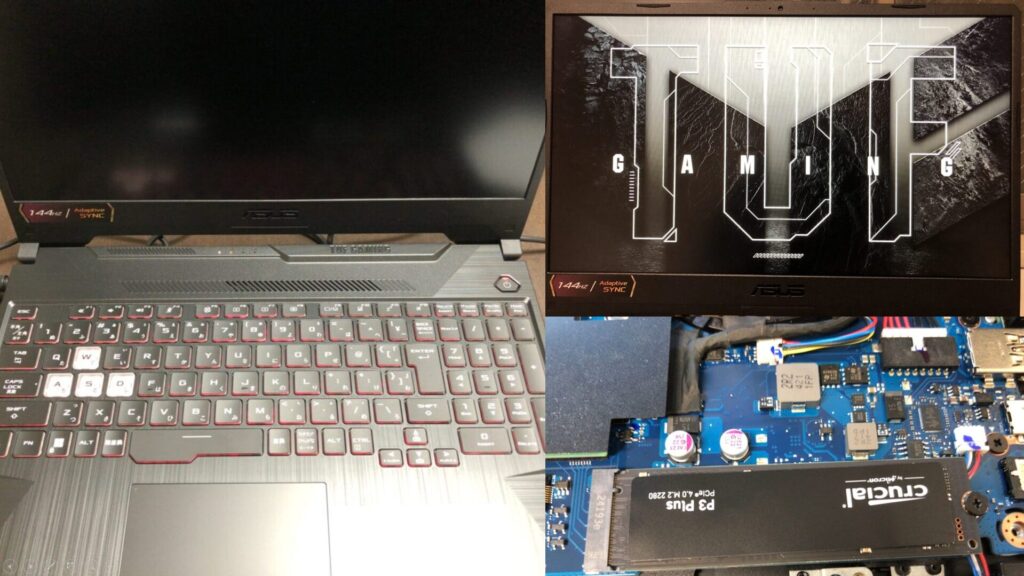
作成したフローで、実際に英会話ができるか試してみました。なお、今回は私のノートPCで実行しました。
▼PCは10万円ぐらいで購入したゲーミングノートPCを利用しています。Windows 11の環境です。
ちょっと買い物:新しいノートPCとSSDの増設(ASUS TUF Gaming A15)
はじめに 今回はこれまで使っていたPCが壊れたので買い替えましたという話です。 以前はよく分からないGPUが載っていたノートPCを使っていたのですが、最近はUnreal E…

 ポチップ
ポチップ
英会話の練習をしたいので、話題を提供してくれないか聞いてみました。
▼LLMなのに、まず天気を聞かれました。
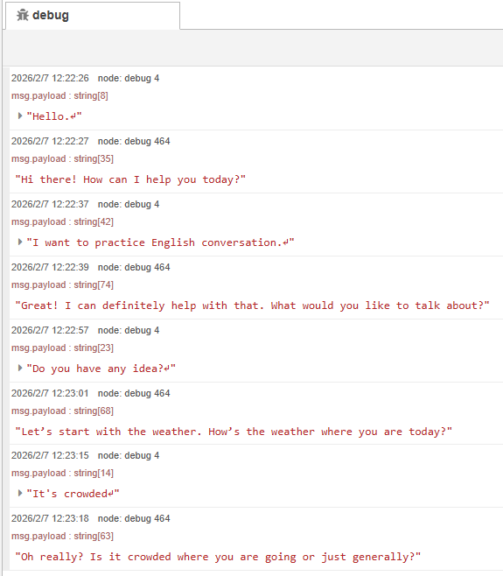
発声終了後、音声認識が行われて、LLMと対話することができました。短く返答するように指定していたこともあり、レスポンスが速かったです。
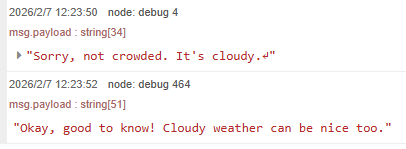
意図しない単語が認識されることもあったのですが、単に私の発音が悪いせいだと思います。
▼このときはcloudyとcrowdedが誤認識されました。
▼ロボットのデザインについて何か案を出してくれないか話そうとしたのですが、単語が思いつきませんでした。
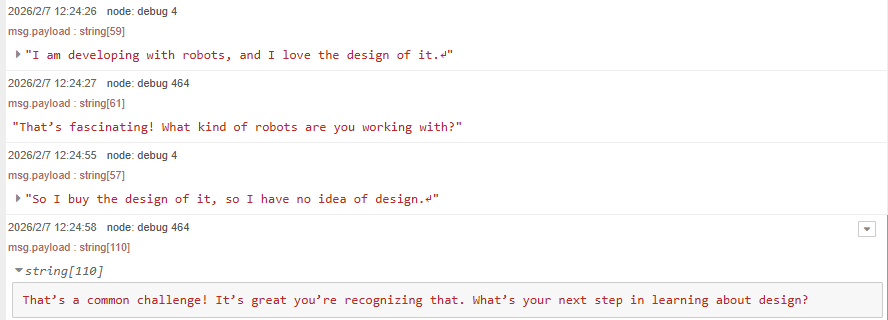
日本語の返答は思いつくものの、英語で何と言えばいいのか分からないときは翻訳文を表示するような機能が欲しいところです。この辺りはNode-REDのダッシュボード画面で作成しようかなと思っています。
▼six hoursがsix of usとして認識されたのですが、文脈からなのか6時間として返答が返ってきました。
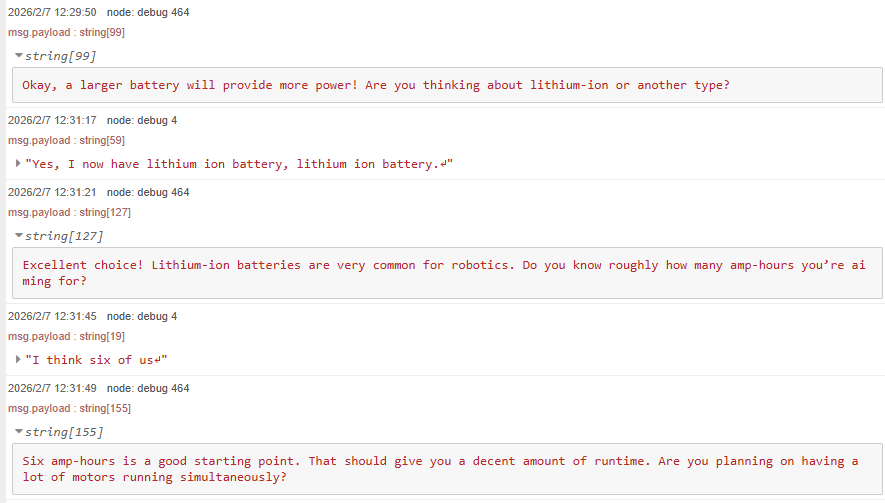
私の発音は人様に聞かせられるようなものではないので、動画は無いのですが、応答は会話として問題ないぐらい速いです。LLMの軽量なモデルだと返答が速すぎて思考しているのか疑わしく思うことがあるのですが、それよりもちょっと遅くてちょうどいい感じです。
最後に
ひとまずLLMと英語で対話することはできるようになったので、実際に使ってみながら改良していこうと思っています。一番気にしていた処理時間については、PCの処理性能に依存しますが、気にならない程度にはなっていると感じています。
他の英語の音声合成ソフトウェアも使ってみたいところです。LLMのプロンプトについては、工夫する必要がありそうだなと思っています。
▼日本語の音声合成もできるので、ほとんど同じフローでロボット用の対話システムも作れそうだなと思っています。
Node-REDを使ってみる その7(VOICEVOXエンジン、日本語の音声合成)
はじめに 今回はNode-REDでVOICEVOXエンジンのAPIを利用してみました。 以前VOICEVOX COREを用いた音声合成については試したことがあります。 ▼こちらの記事で試して…