Creating Nodes for Node-RED MCU Part 3 (Serial Node)
 管理人
管理人Introduction
In this post, I created a Serial node for Node-RED MCU. While the debugger tool already uses serial communication, this node allows for serial communication on other ports. The node I created is published on npm and GitHub. You can also install it via the "Manage palette" option in Node-RED.
▼npm page:
https://www.npmjs.com/package/@background404/node-red-contrib-mcu-serial
▼GitHub repository:
https://github.com/404background/node-red-contrib-mcu-serial
This article covers the content for version 0.2.0.
I received an issue report from Mr. Peter Hoddie and am currently adding more features. Please check the repository for the latest version.
https://github.com/404background/node-red-contrib-mcu-serial/issues/1
https://github.com/404background/node-red-contrib-mcu-serial/issues/3
▼Previous articles:
Creating Node for Node-RED MCU Part 1 (LINE Notify)
Introduction In a previous article, I introduced information related to Node-RED that I used during the hackathon. Since then, I have been experimenting with…
 趣味的ロボット研究所
Creating Node for Node-RED MCU Part 2 (Servo node)
Introduction I previously posted an article on Qiita about creating a Servo node for a Node-RED MCU. At that time, I only did the processing of msg.payload t…
▼Brief introduction to Node-RED and Node-RED MCU:
書籍紹介:『はじめてのNode-RED』/『はじめてのNode-RED MCU Edition』 - 趣味的ロボット研究所
Node-REDとは 一言でいうと、Node-REDはプログラミングが簡単にできるツールです。ビジュアルプログラミングの一種で、視覚的にわかりやすくなっています。▼百聞は一見に…
Testing with the Function Node
Members of the Node-RED MCU community have been testing the Serial class within function nodes. You can find detailed articles on that here (Japanese):
I wrote a program following those articles and confirmed it works.
▼This articles:
https://qiita.com/NWLab/items/5360eff7b8e2685e925a
https://qiita.com/mshioji/items/a750a5d713ab4d54c4cf
The Moddable SDK documentation also provides sample programs for the Serial class.
▼Check here for callbacks and properties:
https://github.com/Moddable-OpenSource/moddable/blob/public/documentation/io/io.md#serial
One of the callbacks is onReadable(). This is where you describe the process to execute when data is received via serial communication.
Creating the Node
File Structure
There are five main files:
- package.json: Specifies the files to be loaded by Node-RED.
- manifest.json: Specifies the files to be loaded by Node-RED MCU.
- node/mcu_serial.js: Defines the node's functionality within Node-RED.
- node/mcu_serial.html: Defines the node's appearance within Node-RED.
- node/serial.js: The program to be flashed onto the microcontroller.
▼Structure diagram:
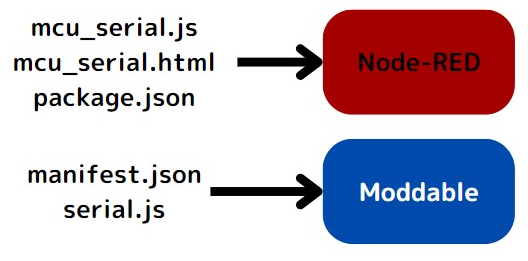
Note: If you write the contents of serial.js directly into mcu_serial.js, Node-RED will throw an error and fail to build. This is because it includes classes from the Moddable SDK. Separating the files avoids this issue.
This structure is based on the I2C node in the node-red-mcu repository. The I2C node has "in" and "out" types, so I provided "Serial in" and "Serial out" for this node as well.
▼I2C node reference:
https://github.com/phoddie/node-red-mcu/tree/main/nodes/mcu/i2c
The PWM node is another good example. It sets values in a cache to prevent duplicate class declarations. I initially tried the same for the Serial node, but the cache wasn't being shared when Serial in and Serial out were in separate files, leading to "Serial class already declared" errors. Combining them into one file resolved this.
▼PWM node reference:
https://github.com/phoddie/node-red-mcu/blob/main/nodes/mcu/pwm/pwm.js
About moddable_manifest
Previously, it was necessary to add manifest.json to node_types.json. This was a bit user-unfriendly. However, there is now a mechanism to bypass this by adding moddable_manifest to the HTML file.
▼I received a comment about this on X (formerly Twitter):
▼Discussion link:
https://github.com/phoddie/node-red-mcu/discussions/106#discussioncomment-5434299
Following this advice, I added moddable_manifest to the program. Other parts of the code allow users to input pin numbers, ports, and baud rates.
▼The program code (HTML):
<script type="text/javascript">
    RED.nodes.registerType('mcu_serial_in',{
        category: 'MCU',
        color: '#a2aaff',
        defaults: {
            name: {value:""},
            tx: {value:"", required: true},
            rx: {value:"", required: true},
            baud: {value: "115200"},
            port: {value: "", required: true},
            moddable_manifest: {
                value: {
                    include: [
                        {
                            "git": "https://github.com/404background/node-red-contrib-mcu-serial.git"
                        }
                    ]
                }
            }
        },
        inputs: 0,
        outputs: 1,
        icon: "serial.svg",
		align: "left",
        paletteLabel: 'Serial in',
        label: function() {
            return this.name||"serial in"
        }
    })
</script>

<script type="text/javascript">
    RED.nodes.registerType('mcu_serial_out',{
        category: 'MCU',
        color: '#a2aaff',
        defaults: {
            name: {value:""},
            tx: {value:"", required: true},
            rx: {value:"", required: true},
            baud: {value: "115200"},
            port: {value: "", required: true},
            moddable_manifest: {
                value: {
                    include: [
                        {
                            "git": "https://github.com/404background/node-red-contrib-mcu-serial.git"
                        }
                    ]
                }
            }
        },
        inputs: 1,
        outputs: 0,
        icon: "serial.svg",
		align: "right",
        paletteLabel: 'Serial out',
        label: function() {
            return this.name||"serial_out"
        }
    })
</script>


<script type="text/html" data-template-name="mcu_serial_in">
    <div class="form-row">
        <label for="node-input-name"><i class="fa fa-tag"></i> Name</label>
        <input type="text" id="node-input-name" placeholder="Name"><br>
        <label for="node-input-tx"><i class="fa fa-tag"></i> TX</label>
		<input type="number" id="node-input-tx" style="width:60px"><br>
        <label for="node-input-rx"><i class="fa fa-tag"></i> RX</label>
		<input type="number" id="node-input-rx" style="width:60px"><br>
        <label for="node-input-port"><i class="fa fa-tag"></i> Port</label>
		<input type="number" id="node-input-port" style="width:60px"><br>
        <label for="node-input-baud"><i class="fa fa-tag"></i> Baud</label>
		<input type="number" id="node-input-baud" style="width:100px"><br>
    </div>
</script>

<script type="text/html" data-template-name="mcu_serial_out">
    <div class="form-row">
        <label for="node-input-name"><i class="fa fa-tag"></i> Name</label>
        <input type="text" id="node-input-name" placeholder="Name"><br>
        <label for="node-input-tx"><i class="fa fa-tag"></i> TX</label>
		<input type="number" id="node-input-tx" style="width:60px"><br>
        <label for="node-input-rx"><i class="fa fa-tag"></i> RX</label>
		<input type="number" id="node-input-rx" style="width:60px"><br>
        <label for="node-input-port"><i class="fa fa-tag"></i> Port</label>
		<input type="number" id="node-input-port" style="width:60px"><br>
        <label for="node-input-baud"><i class="fa fa-tag"></i> Baud</label>
		<input type="number" id="node-input-baud" style="width:100px"><br>
    </div>
</script>
About serial.js
Based on an issue report, I modified the code to support multiple node placements. The Serial_in and Serial_out classes now call the add method of the Serial class.
I'm calling the Serial class in the highlighted line 10.
▼The program code (serial.js):
import {Node} from "nodered"
let cache

class Serial {
	static add(config, reader) {
		const cachePort = 'mcu_serial' + Number(config.port);
		cache ??= new Map;
		let serial = cache.get(cachePort);
		if (!serial) {
			serial = new device.io.Serial({
				baud: Number(config.baud),
				port: Number(config.port),
				receive: Number(config.rx),
				transmit: Number(config.tx),
				onReadable() {
					let msg = String.fromArrayBuffer(this.read());
					msg = msg.trimEnd()
					this.readers.forEach(reader => {
						reader.send({payload: msg})
					});
				}
			})
			cache.set(cachePort, serial)
			serial.readers = [];
		}
		if (reader)
			serial.readers.push(reader);
		return serial;
	}
}

class Serial_in extends Node {
	onStart(config) {
		super.onStart(config)

		try {
			Serial.add(config, this);
		}
		catch {
			this.status({fill: "red", shape: "dot", text: "node-red:common.status.error"})
		}
	}

	static type = "mcu_serial_in"
	static {
		RED.nodes.registerType(this.type, this)
	}
}


class Serial_out extends Node {
	#serial

	onStart(config) {
		super.onStart(config)

		try {
			this.#serial = Serial.add(config);
		}
		catch {
			this.status({fill: "red", shape: "dot", text: "node-red:common.status.error"})
		}
	}

	onMessage(msg, done) {
		if (msg.payload != null){
			this.#serial.write(ArrayBuffer.fromString(msg.payload + "\n"))
		}
		this.send(msg)
		done()
	}

	static type = "mcu_serial_out"
	static {
		RED.nodes.registerType(this.type, this)
	}
}
Other Files
The other files are quite simple.
▼mcu_serial.js (Creating the nodes):
module.exports = function(RED) {
    function Serial_in(config) {
        RED.nodes.createNode(this, config)
		console.log(config)
    }
    RED.nodes.registerType("mcu_serial_in", Serial_in)

    function Serial_out(config) {
        RED.nodes.createNode(this, config)
		console.log(config)
    }
    RED.nodes.registerType("mcu_serial_out", Serial_out)
}
▼manifest.json (Specifying serial.js location):
{
	"modules": {
		"mcu_serial": "./node/serial"
	},
	"preload": "mcu_serial"
}
Installing in a Local Environment
You can install the node by running the following command in the directory where Node-RED's package.json is located:
npm install /path/to/your/folder
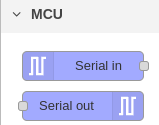
▼Since the category is set to "MCU," it appears alongside the other Node-RED MCU plugin nodes.
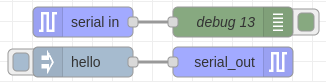
▼When placed on the workspace:
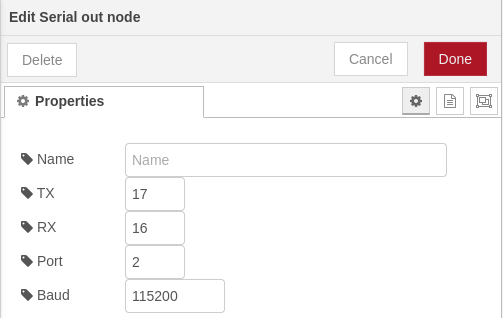
▼The edit screen allows inputting pin numbers, ports, and baud rates.
Verification
I plugged a UART converter into the USB port of a Raspberry Pi 400 and connected it to the microcontroller pins.
▼The UART converter is this type:
Pin assignments:
- Port2
- TX:17
- RX:16
- Port1
- TX:32
- RX:33
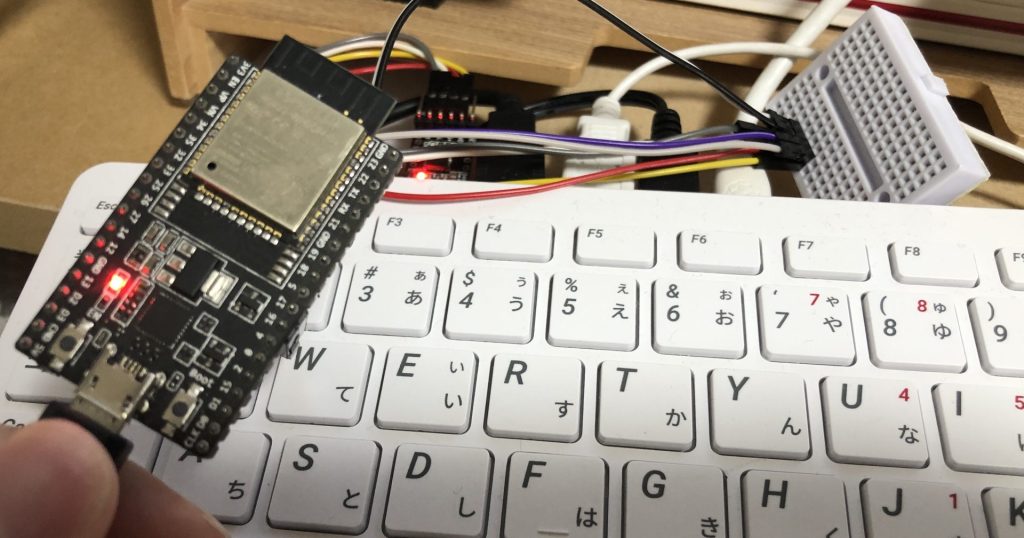
▼Verified with Moddable Two and an ESP32 development board.

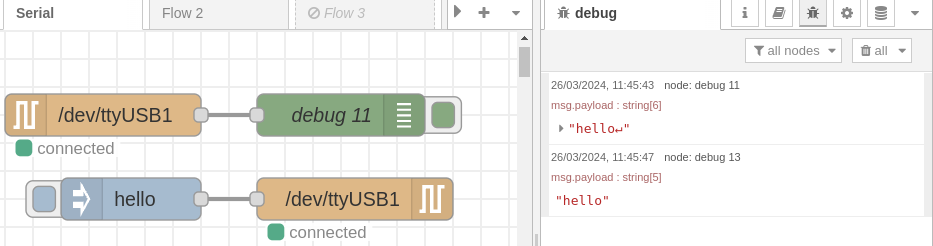
I placed Serial in and Serial out nodes in Node-RED on the Raspberry Pi 400 and tested the communication.
▼It seems to be communicating correctly.
▼I also tried multiple nodes and ports, and it worked perfectly.
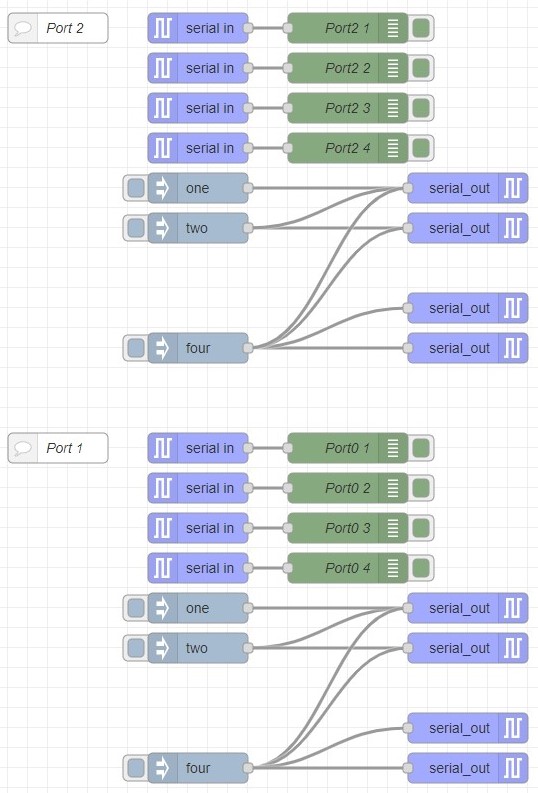
▼Sample Flow JSON:
[{"id":"c89a7915711bfdeb","type":"mcu_serial_in","z":"2eb8ae4cb799d590","name":"","tx":"17","rx":"16","baud":"115200","port":"2","_mcu":{"mcu":true},"x":290,"y":280,"wires":[["8b1fa7b8a67af26b"]]},{"id":"339b61347fce7654","type":"mcu_serial_out","z":"2eb8ae4cb799d590","name":"","tx":"17","rx":"16","baud":"115200","port":"2","_mcu":{"mcu":true},"x":560,"y":320,"wires":[]},{"id":"c2ecbb9ad97eb951","type":"mcu_serial_in","z":"2eb8ae4cb799d590","name":"","tx":"17","rx":"16","baud":"115200","port":"2","_mcu":{"mcu":true},"x":290,"y":240,"wires":[["3e015ac89dd2d7c7"]]},{"id":"2a8a61ef546a55a5","type":"mcu_serial_out","z":"2eb8ae4cb799d590","name":"","tx":"17","rx":"16","baud":"115200","port":"2","_mcu":{"mcu":true},"x":560,"y":360,"wires":[]},{"id":"29b69e6ea1d47b25","type":"mcu_serial_out","z":"2eb8ae4cb799d590","name":"","tx":"17","rx":"16","baud":"115200","port":"2","_mcu":{"mcu":true},"x":560,"y":440,"wires":[]},{"id":"ac9bc3d9e001354c","type":"mcu_serial_out","z":"2eb8ae4cb799d590","name":"","tx":"17","rx":"16","baud":"115200","port":"2","_mcu":{"mcu":true},"x":560,"y":480,"wires":[]},{"id":"876dad9e9d96429e","type":"mcu_serial_in","z":"2eb8ae4cb799d590","name":"","tx":"17","rx":"16","baud":"115200","port":"2","_mcu":{"mcu":true},"x":290,"y":200,"wires":[["b9bd6be923e97f86"]]},{"id":"acea8e5c05d25374","type":"mcu_serial_in","z":"2eb8ae4cb799d590","name":"","tx":"17","rx":"16","baud":"115200","port":"2","_mcu":{"mcu":true},"x":290,"y":160,"wires":[["9277468d9337d91c"]]},{"id":"d2c338a2a7c651a7","type":"mcu_serial_out","z":"2eb8ae4cb799d590","name":"","tx":"32","rx":"33","baud":"115200","port":"1","_mcu":{"mcu":true},"x":560,"y":740,"wires":[]},{"id":"4ac79b2549d24954","type":"mcu_serial_in","z":"2eb8ae4cb799d590","name":"","tx":"32","rx":"33","baud":"115200","port":"1","_mcu":{"mcu":true},"x":290,"y":580,"wires":[["d29834a11cc8e2ad"]]},{"id":"e21beb58cbcd545f","type":"mcu_serial_out","z":"2eb8ae4cb799d590","name":"","tx":"32","rx":"33","baud":"115200","port":"1","_mcu":{"mcu":true},"x":560,"y":780,"wires":[]},{"id":"371bcdb0d5ebb8f0","type":"mcu_serial_out","z":"2eb8ae4cb799d590","name":"","tx":"32","rx":"33","baud":"115200","port":"1","_mcu":{"mcu":true},"x":560,"y":860,"wires":[]},{"id":"e4eb27aab5762f9f","type":"mcu_serial_out","z":"2eb8ae4cb799d590","name":"","tx":"32","rx":"33","baud":"115200","port":"1","_mcu":{"mcu":true},"x":560,"y":900,"wires":[]},{"id":"305d1470cfcd1b67","type":"comment","z":"2eb8ae4cb799d590","name":"Port 1","info":"","_mcu":{"mcu":true},"x":150,"y":580,"wires":[]},{"id":"6f42bcd6ce0555eb","type":"comment","z":"2eb8ae4cb799d590","name":"Port 2","info":"","_mcu":{"mcu":true},"x":150,"y":160,"wires":[]},{"id":"3d6157a653b67692","type":"inject","z":"2eb8ae4cb799d590","name":"","props":[{"p":"payload"},{"p":"topic","vt":"str"}],"repeat":"","crontab":"","once":false,"onceDelay":0.1,"topic":"","payload":"one","payloadType":"str","_mcu":{"mcu":true},"x":290,"y":320,"wires":[["339b61347fce7654"]]},{"id":"177c2c3449b7cf91","type":"inject","z":"2eb8ae4cb799d590","name":"","props":[{"p":"payload"},{"p":"topic","vt":"str"}],"repeat":"","crontab":"","once":false,"onceDelay":0.1,"topic":"","payload":"two","payloadType":"str","_mcu":{"mcu":true},"x":290,"y":360,"wires":[["2a8a61ef546a55a5","339b61347fce7654"]]},{"id":"65ae2dc4ee97c76a","type":"inject","z":"2eb8ae4cb799d590","name":"","props":[{"p":"payload"},{"p":"topic","vt":"str"}],"repeat":"","crontab":"","once":false,"onceDelay":0.1,"topic":"","payload":"four","payloadType":"str","_mcu":{"mcu":true},"x":290,"y":480,"wires":[["ac9bc3d9e001354c","29b69e6ea1d47b25","2a8a61ef546a55a5","339b61347fce7654"]]},{"id":"c5f1494b658b3189","type":"inject","z":"2eb8ae4cb799d590","name":"","props":[{"p":"payload"},{"p":"topic","vt":"str"}],"repeat":"","crontab":"","once":false,"onceDelay":0.1,"topic":"","payload":"two","payloadType":"str","_mcu":{"mcu":true},"x":290,"y":780,"wires":[["d2c338a2a7c651a7","e21beb58cbcd545f"]]},{"id":"d9f4cd3b754be5c0","type":"inject","z":"2eb8ae4cb799d590","name":"","props":[{"p":"payload"},{"p":"topic","vt":"str"}],"repeat":"","crontab":"","once":false,"onceDelay":0.1,"topic":"","payload":"one","payloadType":"str","_mcu":{"mcu":true},"x":290,"y":740,"wires":[["d2c338a2a7c651a7"]]},{"id":"ea5592c8964b4472","type":"inject","z":"2eb8ae4cb799d590","name":"","props":[{"p":"payload"},{"p":"topic","vt":"str"}],"repeat":"","crontab":"","once":false,"onceDelay":0.1,"topic":"","payload":"four","payloadType":"str","_mcu":{"mcu":true},"x":290,"y":900,"wires":[["d2c338a2a7c651a7","e21beb58cbcd545f","371bcdb0d5ebb8f0","e4eb27aab5762f9f"]]},{"id":"8b1fa7b8a67af26b","type":"debug","z":"2eb8ae4cb799d590","name":"Port2 4","active":true,"tosidebar":true,"console":false,"tostatus":false,"complete":"payload","targetType":"msg","statusVal":"","statusType":"auto","_mcu":{"mcu":true},"x":440,"y":280,"wires":[]},{"id":"3e015ac89dd2d7c7","type":"debug","z":"2eb8ae4cb799d590","name":"Port2 3","active":true,"tosidebar":true,"console":false,"tostatus":false,"complete":"payload","targetType":"msg","statusVal":"","statusType":"auto","_mcu":{"mcu":true},"x":440,"y":240,"wires":[]},{"id":"b9bd6be923e97f86","type":"debug","z":"2eb8ae4cb799d590","name":"Port2 2","active":true,"tosidebar":true,"console":false,"tostatus":false,"complete":"payload","targetType":"msg","statusVal":"","statusType":"auto","_mcu":{"mcu":true},"x":440,"y":200,"wires":[]},{"id":"9277468d9337d91c","type":"debug","z":"2eb8ae4cb799d590","name":"Port2 1","active":true,"tosidebar":true,"console":false,"tostatus":false,"complete":"payload","targetType":"msg","statusVal":"","statusType":"auto","_mcu":{"mcu":true},"x":440,"y":160,"wires":[]},{"id":"3c1959db7312756a","type":"debug","z":"2eb8ae4cb799d590","name":"Port0 4","active":true,"tosidebar":true,"console":false,"tostatus":false,"complete":"payload","targetType":"msg","statusVal":"","statusType":"auto","_mcu":{"mcu":true},"x":440,"y":700,"wires":[]},{"id":"b417cd6de3aa689b","type":"debug","z":"2eb8ae4cb799d590","name":"Port0 3","active":true,"tosidebar":true,"console":false,"tostatus":false,"complete":"payload","targetType":"msg","statusVal":"","statusType":"auto","_mcu":{"mcu":true},"x":440,"y":660,"wires":[]},{"id":"4fa1b84c726a7d14","type":"debug","z":"2eb8ae4cb799d590","name":"Port0 2","active":true,"tosidebar":true,"console":false,"tostatus":false,"complete":"payload","targetType":"msg","statusVal":"","statusType":"auto","_mcu":{"mcu":true},"x":440,"y":620,"wires":[]},{"id":"d29834a11cc8e2ad","type":"debug","z":"2eb8ae4cb799d590","name":"Port0 1","active":true,"tosidebar":true,"console":false,"tostatus":false,"complete":"payload","targetType":"msg","statusVal":"","statusType":"auto","_mcu":{"mcu":true},"x":440,"y":580,"wires":[]},{"id":"d6bd987f16963f4e","type":"mcu_serial_in","z":"2eb8ae4cb799d590","name":"","tx":"32","rx":"33","baud":"115200","port":"1","_mcu":{"mcu":true},"x":290,"y":620,"wires":[["4fa1b84c726a7d14"]]},{"id":"5e44451b2d96f012","type":"mcu_serial_in","z":"2eb8ae4cb799d590","name":"","tx":"32","rx":"33","baud":"115200","port":"1","_mcu":{"mcu":true},"x":290,"y":660,"wires":[["b417cd6de3aa689b"]]},{"id":"1041e276a55d5f3d","type":"mcu_serial_in","z":"2eb8ae4cb799d590","name":"","tx":"32","rx":"33","baud":"115200","port":"1","_mcu":{"mcu":true},"x":290,"y":700,"wires":[["3c1959db7312756a"]]}]▼Demonstration Video:
Finally
The Serial node was a test to see if I could use Moddable SDK features in external nodes. Since I've confirmed it works, I might be able to create nodes with other functionalities using the same mechanism.
This Serial node might become more complex as I add the currently pending features. The content described in this article is simpler and should serve as a good reference for anyone wanting to create their own nodes.
I know it's a bit of a niche endeavor, though...