Searching with Python and Summarizing with a Local LLM (Ollama, Node-RED)
 管理人
管理人Introduction
In this post, I experimented with a Python-based search program to automate information gathering.
As usual, I’ve set it up to run within Node-RED, allowing it to interface with other nodes and feed data into a local LLM for processing.
▼Previous articles are here:
Trying Out Collecting Papers with Python Part 1 (arXiv, Node-RED)
Info This article is translated from Japanese to English. Introduction In this post, I tried collecting research papers with Python using the arXiv API.I usual…
 趣味的ロボット研究所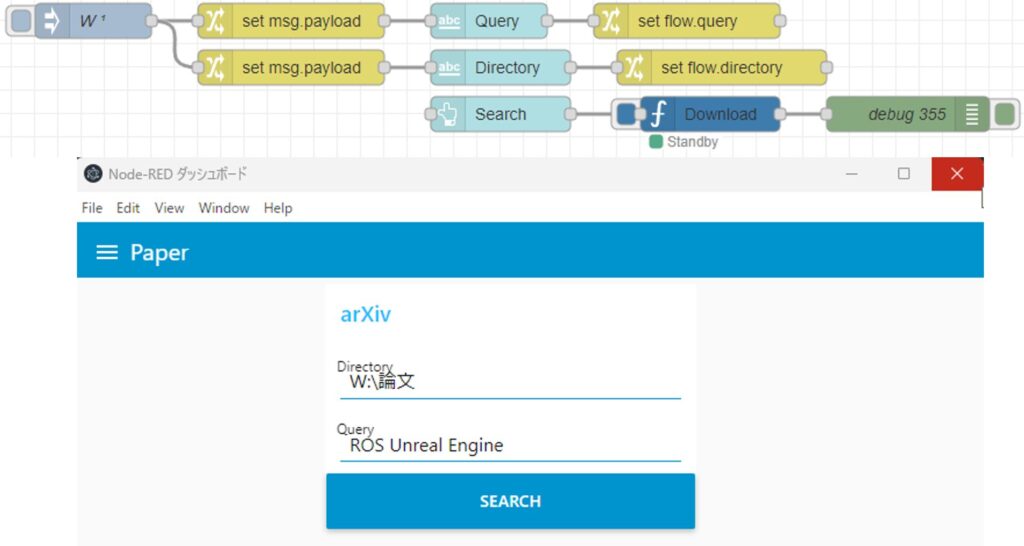
Translating Text with Python (Googletrans, Node-RED)
Info This article is translated from Japanese to English. Introduction In this post, I tried out translation using Googletrans in Python.Although I haven't wri…
Retrieving Search Results Based on Keywords
To execute Python, I am using the "python-venv" node that I developed. This allows you to create a Python virtual environment and run code directly as a Node-RED node.
▼I wrote about the development history at the end of last year:
https://qiita.com/background/items/d2e05e8d85427761a609
I had ChatGPT write the code and created a flow to execute it. Several methods were suggested, but I found success using a package called "duckduckgo_search."
▼Here is the flow:
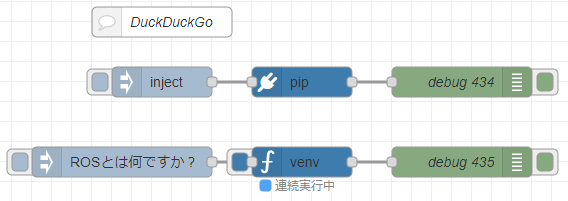
[{"id":"d8a5bb0727beae2a","type":"pip","z":"22eb2b8f4786695c","venvconfig":"015784e9e3e0310a","name":"","arg":"duckduckgo-search","action":"install","tail":false,"x":1550,"y":280,"wires":[["1799d5abf8328a4f"]]},{"id":"460611e4d97c1167","type":"inject","z":"22eb2b8f4786695c","name":"","props":[],"repeat":"","crontab":"","once":false,"onceDelay":0.1,"topic":"","x":1410,"y":280,"wires":[["d8a5bb0727beae2a"]]},{"id":"1799d5abf8328a4f","type":"debug","z":"22eb2b8f4786695c","name":"debug 434","active":true,"tosidebar":true,"console":false,"tostatus":false,"complete":"false","statusVal":"","statusType":"auto","x":1710,"y":280,"wires":[]},{"id":"f9d45ebf97fdcc05","type":"venv","z":"22eb2b8f4786695c","venvconfig":"015784e9e3e0310a","name":"","code":"import json\nimport os\nimport time\nfrom duckduckgo_search import DDGS\n\ndef duckduckgo_search(query):\n \"\"\"DuckDuckGoで検索\"\"\"\n results = []\n with DDGS() as ddgs:\n for result in ddgs.text(query, max_results=5):\n results.append({\n \"title\": result[\"title\"],\n \"url\": result[\"href\"],\n \"content\": result[\"body\"]\n })\n time.sleep(1)\n\n return results\n\ndef collect_information(command):\n \"\"\"自然言語の命令を受け取り、DuckDuckGoで情報を収集してJSONファイルに保存\"\"\"\n results = duckduckgo_search(command)\n\n collected_data = {\n \"command\": command,\n \"results\": results\n }\n\n filename = f\"data.json\"\n\n # JSONとして保存\n with open(filename, \"w\", encoding=\"utf-8\") as f:\n json.dump(collected_data, f, indent=4, ensure_ascii=False)\n\n print(f\"{filename}\")\n\n return filename\n\n# コマンドを入力\nuser_command = msg['payload']\ncollect_information(user_command)\n","continuous":true,"x":1550,"y":360,"wires":[["8ab8688f5429b0c8"]]},{"id":"909b52bae01cbd91","type":"inject","z":"22eb2b8f4786695c","name":"","props":[{"p":"payload"}],"repeat":"","crontab":"","once":false,"onceDelay":0.1,"topic":"","payload":"ROSとは何ですか?","payloadType":"str","x":1370,"y":360,"wires":[["f9d45ebf97fdcc05"]]},{"id":"8ab8688f5429b0c8","type":"debug","z":"22eb2b8f4786695c","name":"debug 435","active":true,"tosidebar":true,"console":false,"tostatus":false,"complete":"false","statusVal":"","statusType":"auto","x":1710,"y":360,"wires":[]},{"id":"763ecd66d84d5cb7","type":"comment","z":"22eb2b8f4786695c","name":"DuckDuckGo","info":"","x":1410,"y":220,"wires":[]},{"id":"015784e9e3e0310a","type":"venv-config","venvname":"AI","version":"3.10"}]I installed the package and ran the test.
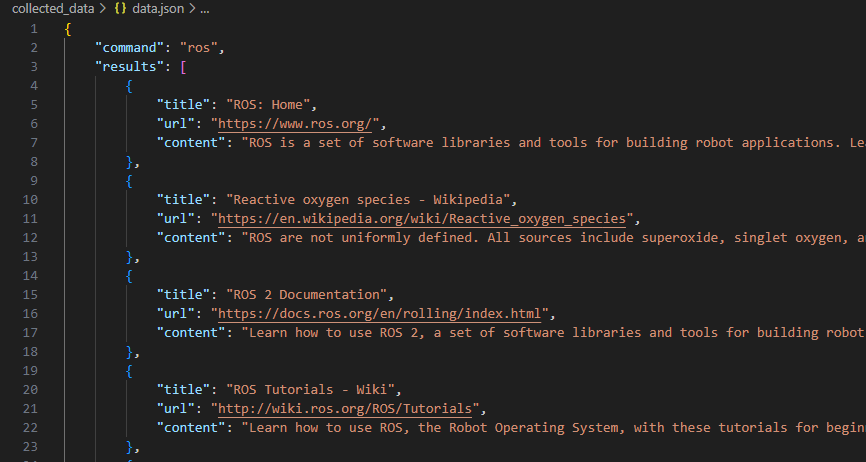
▼When I searched for the term "ros," the search results were successfully saved.
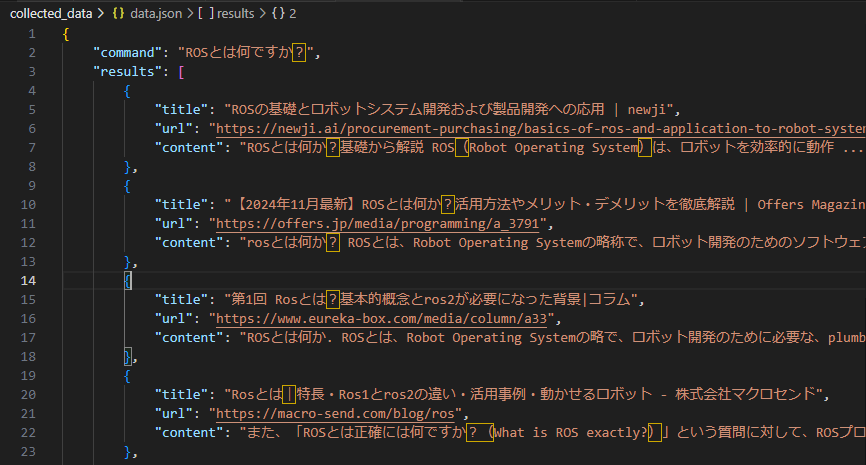
▼Even for a natural language question like "What is ROS?", search results were output. Since I asked in Japanese, I received many results from Japanese articles.
▼After running it several times, I encountered a "Ratelimit" error.

The search became available again after some time, but I haven't found a definitive way to avoid this error yet. I’ll add an update if I find a solution.
Extracting Information from URLs
Since the search results included source URLs, I tried extracting the information directly from those links. I had ChatGPT write this program as well.
▼Here is the flow:
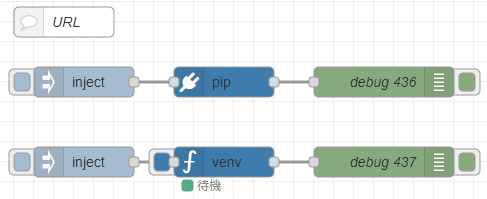
[{"id":"5fd33fd2543212cd","type":"pip","z":"22eb2b8f4786695c","venvconfig":"015784e9e3e0310a","name":"","arg":"requests beautifulsoup4 html2text","action":"install","tail":false,"x":2090,"y":280,"wires":[["33cf763f5da32f69"]]},{"id":"a948a8bac57fad47","type":"inject","z":"22eb2b8f4786695c","name":"","props":[],"repeat":"","crontab":"","once":false,"onceDelay":0.1,"topic":"","x":1950,"y":280,"wires":[["5fd33fd2543212cd"]]},{"id":"33cf763f5da32f69","type":"debug","z":"22eb2b8f4786695c","name":"debug 436","active":true,"tosidebar":true,"console":false,"tostatus":false,"complete":"false","statusVal":"","statusType":"auto","x":2250,"y":280,"wires":[]},{"id":"929be7a9bdb6fbf0","type":"venv","z":"22eb2b8f4786695c","venvconfig":"015784e9e3e0310a","name":"","code":"import requests\nfrom bs4 import BeautifulSoup\nimport html2text\n\ndef fetch_url_content(url):\n \"\"\"指定されたURLからHTMLを取得して、タイトル、見出し、本文を抽出\"\"\"\n # URLのコンテンツを取得\n response = requests.get(url)\n if response.status_code != 200:\n raise Exception(f\"Failed to fetch URL: {url}, status code: {response.status_code}\")\n\n # BeautifulSoupでHTMLを解析\n soup = BeautifulSoup(response.text, 'html.parser')\n\n # 不要なタグを除去(広告やスクリプト、スタイルタグなど)\n for tag in soup(['script', 'style', 'header', 'footer', 'nav', 'aside', 'form', 'input', 'button']):\n tag.decompose()\n\n # タイトルを取得\n title = soup.title.get_text() if soup.title else \"No Title\"\n\n # 見出しタグ(h1, h2, h3, ...)を取得\n headings = []\n for level in range(1, 7): # h1, h2, ..., h6\n headings += [h.get_text(strip=True) for h in soup.find_all(f'h{level}')]\n\n # 本文(pタグやarticleタグ、sectionタグなど)を取得\n paragraphs = []\n content_tags = ['article', 'main', 'section', 'p']\n \n content = []\n for tag in content_tags:\n content += [element.get_text(separator=\"\\n\", strip=True) for element in soup.find_all(tag)]\n\n # <a>タグ内のURLはそのまま出力に保持する\n links = [a['href'] for a in soup.find_all('a', href=True)]\n \n # 重複を避けるためにセットで管理\n content = list(set(content)) # 重複する内容を削除\n\n # 行ごとにテキストを結合\n formatted_text = \"\\n\\n\".join(content)\n\n # html2textを使ってさらに整形(オプション)\n readable_text = html2text.html2text(formatted_text)\n\n # 結果を整理して戻す\n result = f\"Title: {title}\\n\\n\"\n\n if headings:\n result += \"Headings:\\n\" + \"\\n\".join(headings) + \"\\n\\n\"\n\n result += \"Content:\\n\" + readable_text\n\n # URLをそのまま追加\n if links:\n result += \"\\n\\nLinks:\\n\" + \"\\n\".join(links)\n\n return result\n\ndef save_to_file(content, filename=\"output.txt\"):\n \"\"\"取得したテキストをファイルに保存\"\"\"\n with open(filename, 'w', encoding='utf-8') as f:\n f.write(content)\n\n print(f\"{filename}\")\n\n# 実行例\nurl = msg['payload']\ncontent = fetch_url_content(url)\nsave_to_file(content)\n","continuous":true,"x":2090,"y":360,"wires":[["5243e38590f60e87"]]},{"id":"e8176f7b45fb6c6e","type":"inject","z":"22eb2b8f4786695c","name":"","props":[{"p":"payload"}],"repeat":"","crontab":"","once":false,"onceDelay":0.1,"topic":"","payload":"https://404background.com/program/esp32c3-6/","payloadType":"str","x":1950,"y":360,"wires":[["929be7a9bdb6fbf0"]]},{"id":"5243e38590f60e87","type":"debug","z":"22eb2b8f4786695c","name":"debug 437","active":true,"tosidebar":true,"console":false,"tostatus":false,"complete":"false","statusVal":"","statusType":"auto","x":2250,"y":360,"wires":[]},{"id":"bcc189344e12d2c4","type":"comment","z":"22eb2b8f4786695c","name":"URL","info":"","x":1930,"y":220,"wires":[]},{"id":"015784e9e3e0310a","type":"venv-config","venvname":"AI","version":"3.10"}]▼I targeted an article from this site for the test:
Trying Out XIAO ESP32C3 Part 6 (Communication with DUALSHOCK 4 using Node-RED)
Info This article is translated from Japanese to English. Introduction In this post, I tried operating a small robot equipped with a XIAO ESP32C3 using a DUALS…
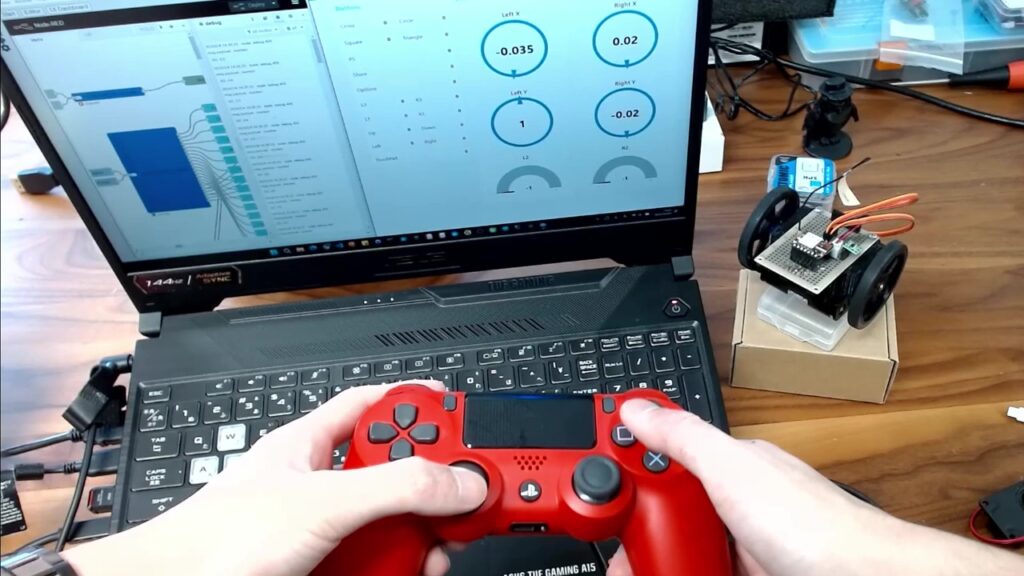
▼The results were retrieved as follows:

It successfully extracted the title, the article body, and the URLs contained within the post.
Using a Local LLM
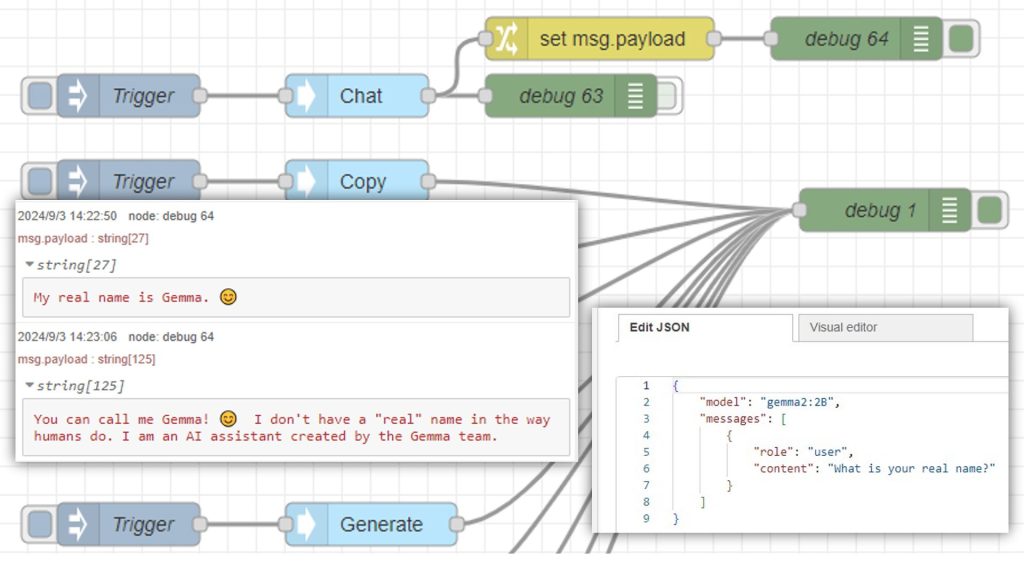
I used the "Ollama" node, which I've featured before, to handle the input of search results and the final output via a local LLM.
▼I’ve used it in this article as well:
Using Ollama Part 1 (Gemma2, Node-RED)
Info This article is translated from Japanese to English. Introduction This time, I tried using Ollama, a tool that lets you run LLMs locally. You can install …
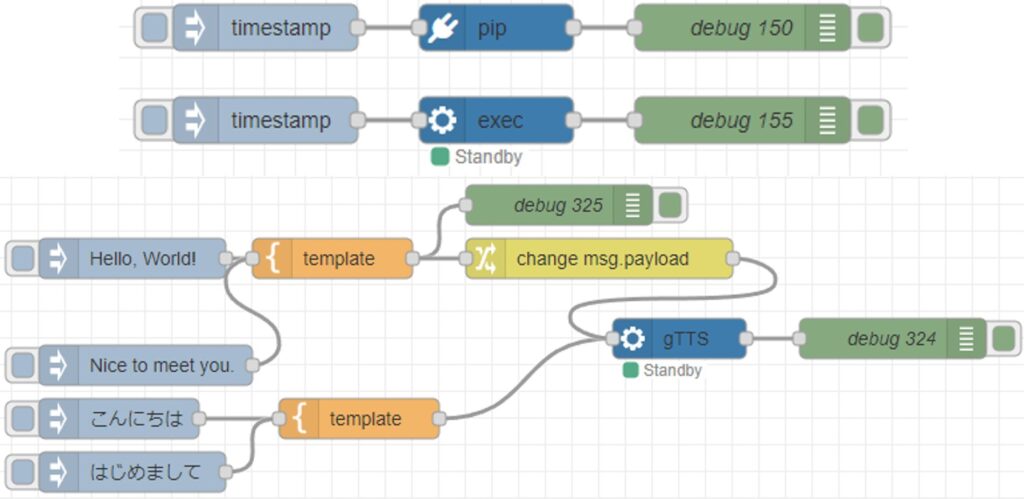
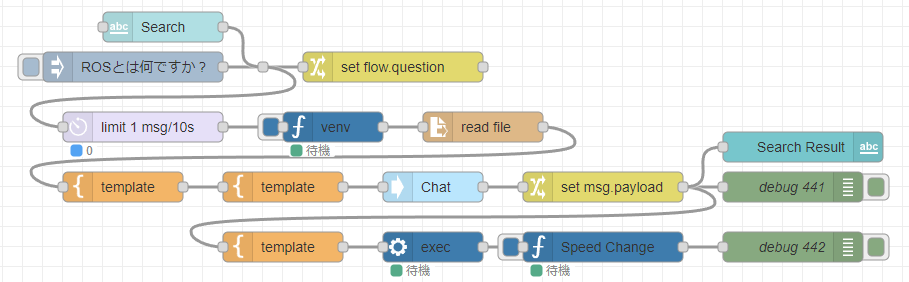
▼Here is the overall flow:
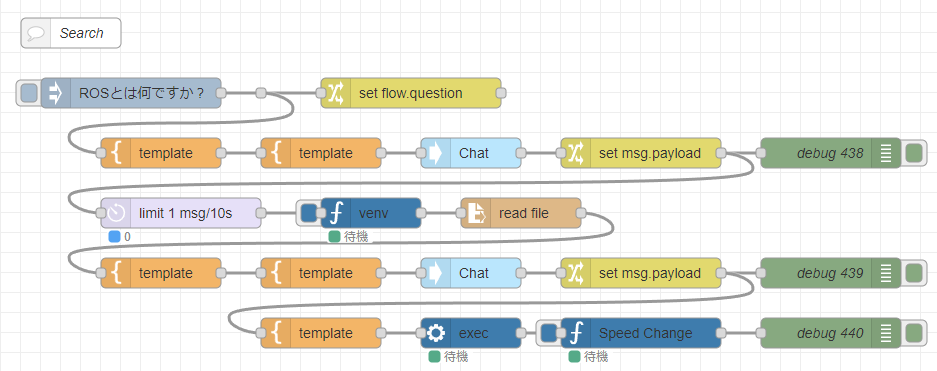
[{"id":"f9d45ebf97fdcc05","type":"venv","z":"22eb2b8f4786695c","venvconfig":"015784e9e3e0310a","name":"","code":"import json\nimport os\nimport time\nfrom duckduckgo_search import DDGS\n\ndef duckduckgo_search(query):\n \"\"\"DuckDuckGoで検索\"\"\"\n results = []\n with DDGS() as ddgs:\n for result in ddgs.text(query, max_results=5):\n results.append({\n \"title\": result[\"title\"],\n \"url\": result[\"href\"],\n \"content\": result[\"body\"]\n })\n time.sleep(1)\n\n return results\n\ndef collect_information(command):\n \"\"\"自然言語の命令を受け取り、DuckDuckGoで情報を収集してJSONファイルに保存\"\"\"\n results = duckduckgo_search(command)\n\n collected_data = {\n \"command\": command,\n \"results\": results\n }\n\n filename = f\"data.json\"\n\n # JSONとして保存\n with open(filename, \"w\", encoding=\"utf-8\") as f:\n json.dump(collected_data, f, indent=4, ensure_ascii=False)\n\n print(f\"{filename}\")\n\n return filename\n\n# コマンドを入力\nuser_command = msg['payload']\ncollect_information(user_command)\n","continuous":true,"x":1750,"y":680,"wires":[["8df6f60cdf131317"]]},{"id":"b677330fdf7a781f","type":"template","z":"22eb2b8f4786695c","name":"","field":"payload","fieldType":"msg","format":"handlebars","syntax":"mustache","template":"{\n \"model\": \"llama3.2:3b\",\n \"messages\": [\n {\n \"role\": \"user\",\n \"content\": \"{{payload}}\"\n }\n ]\n}","output":"json","x":1700,"y":620,"wires":[["f1a3fff94e8ca7f6"]]},{"id":"8b8966839246b073","type":"template","z":"22eb2b8f4786695c","name":"","field":"payload","fieldType":"msg","format":"handlebars","syntax":"mustache","template":"命令をもとに、Webで検索するためのワードを考えてください。\nあなたの回答をもとにプログラムで検索するので、そのワードだけ答えてください。\n\n命令:{{payload}}","output":"str","x":1540,"y":620,"wires":[["b677330fdf7a781f"]]},{"id":"f1a3fff94e8ca7f6","type":"ollama-chat","z":"22eb2b8f4786695c","name":"Chat","server":"","model":"","modelType":"str","messages":"","messagesType":"msg","format":"","stream":false,"keepAlive":"","keepAliveType":"str","tools":"","options":"","x":1850,"y":620,"wires":[["c6131e4553e5be27"]]},{"id":"c6131e4553e5be27","type":"change","z":"22eb2b8f4786695c","name":"","rules":[{"t":"set","p":"payload","pt":"msg","to":"payload.message.content","tot":"msg"}],"action":"","property":"","from":"","to":"","reg":false,"x":2020,"y":620,"wires":[["f8fed00677b951a2","7808af3273d5acc9"]]},{"id":"e289912f42633e7e","type":"inject","z":"22eb2b8f4786695c","name":"","props":[{"p":"payload"}],"repeat":"","crontab":"","once":false,"onceDelay":0.1,"topic":"","payload":"ROSとは何ですか?","payloadType":"str","x":1510,"y":560,"wires":[["a26ee4017359fea0"]]},{"id":"f8fed00677b951a2","type":"debug","z":"22eb2b8f4786695c","name":"debug 438","active":true,"tosidebar":true,"console":false,"tostatus":false,"complete":"payload","targetType":"msg","statusVal":"","statusType":"auto","x":2210,"y":620,"wires":[]},{"id":"9d063052a8959a74","type":"template","z":"22eb2b8f4786695c","name":"","field":"payload","fieldType":"msg","format":"handlebars","syntax":"mustache","template":"{\n \"model\": \"llama3.2:3b\",\n \"messages\": [\n {\n \"role\": \"user\",\n \"content\": \"{{payload}}\"\n }\n ]\n}","output":"json","x":1700,"y":740,"wires":[["0ced2912fbb33769"]]},{"id":"9f6412eb269068c8","type":"template","z":"22eb2b8f4786695c","name":"","field":"payload","fieldType":"msg","format":"handlebars","syntax":"mustache","template":"他のプログラムで質問内容をもとに検索しました。\nあなたの知識を踏まえて要約し、回答してください。\nあなたの回答文を音声に変換して再生するので、改行を入れず短く回答してください。\n\n質問内容:{{flow.question}}\n検索結果:{{payload}}","output":"str","x":1540,"y":740,"wires":[["9d063052a8959a74"]]},{"id":"0ced2912fbb33769","type":"ollama-chat","z":"22eb2b8f4786695c","name":"Chat","server":"","model":"","modelType":"str","messages":"","messagesType":"msg","format":"","stream":false,"keepAlive":"","keepAliveType":"str","tools":"","options":"","x":1850,"y":740,"wires":[["d39d0a6847e35ac6"]]},{"id":"d39d0a6847e35ac6","type":"change","z":"22eb2b8f4786695c","name":"","rules":[{"t":"set","p":"payload","pt":"msg","to":"payload.message.content","tot":"msg"}],"action":"","property":"","from":"","to":"","reg":false,"x":2020,"y":740,"wires":[["e39e70aeb8969fbd","86665d76c26027dd"]]},{"id":"e39e70aeb8969fbd","type":"debug","z":"22eb2b8f4786695c","name":"debug 439","active":true,"tosidebar":true,"console":false,"tostatus":false,"complete":"false","statusVal":"","statusType":"auto","x":2210,"y":740,"wires":[]},{"id":"8df6f60cdf131317","type":"file in","z":"22eb2b8f4786695c","name":"","filename":"payload","filenameType":"msg","format":"utf8","chunk":false,"sendError":false,"encoding":"none","allProps":false,"x":1900,"y":680,"wires":[["9f6412eb269068c8"]]},{"id":"f4cbb6c043953de3","type":"change","z":"22eb2b8f4786695c","name":"","rules":[{"t":"set","p":"question","pt":"flow","to":"payload","tot":"msg"}],"action":"","property":"","from":"","to":"","reg":false,"x":1790,"y":560,"wires":[[]]},{"id":"cf8b5d6b47f9c9aa","type":"venv-exec","z":"22eb2b8f4786695c","name":"","venvconfig":"015784e9e3e0310a","mode":"execute","executable":"gtts-cli.exe","arguments":"","x":1850,"y":800,"wires":[["6cda5a40f86de916"]]},{"id":"86665d76c26027dd","type":"template","z":"22eb2b8f4786695c","name":"","field":"payload","fieldType":"msg","format":"handlebars","syntax":"mustache","template":"\"{{payload}}\" --output voice.mp3 --lang ja","output":"str","x":1700,"y":800,"wires":[["cf8b5d6b47f9c9aa"]]},{"id":"6cda5a40f86de916","type":"venv","z":"22eb2b8f4786695c","venvconfig":"015784e9e3e0310a","name":"Speed Change","code":"import pyaudio\nimport numpy as np\nfrom pydub import AudioSegment\n\n# MP3ファイルの読み込み\nfile_path = 'voice.mp3'\naudio = AudioSegment.from_mp3(file_path)\n\n# 再生速度を変更\naudio_speed = 1.4\naudio = audio.speedup(playback_speed=audio_speed)\n\n# 音声データをnumpy配列に変換\nsamples = np.array(audio.get_array_of_samples())\n\n# サンプリングレートを取得\nframerate = audio.frame_rate\n\n# pyaudioで音声再生\np = pyaudio.PyAudio()\nstream = p.open(format=pyaudio.paInt16, channels=1, rate=framerate, output=True)\n\n# 音声データを再生\nstream.write(samples.tobytes())\nstream.stop_stream()\nstream.close()\np.terminate()\n","continuous":true,"x":2020,"y":800,"wires":[["6887802bf362bec7"]]},{"id":"6887802bf362bec7","type":"debug","z":"22eb2b8f4786695c","name":"debug 440","active":true,"tosidebar":true,"console":false,"tostatus":false,"complete":"false","statusVal":"","statusType":"auto","x":2210,"y":800,"wires":[]},{"id":"7808af3273d5acc9","type":"delay","z":"22eb2b8f4786695c","name":"","pauseType":"rate","timeout":"5","timeoutUnits":"seconds","rate":"1","nbRateUnits":"10","rateUnits":"second","randomFirst":"1","randomLast":"5","randomUnits":"seconds","drop":false,"allowrate":false,"outputs":1,"x":1560,"y":680,"wires":[["f9d45ebf97fdcc05"]]},{"id":"d5ed7a966d03556c","type":"comment","z":"22eb2b8f4786695c","name":"Search","info":"","x":1450,"y":500,"wires":[]},{"id":"a26ee4017359fea0","type":"junction","z":"22eb2b8f4786695c","x":1640,"y":560,"wires":[["f4cbb6c043953de3","8b8966839246b073"]]},{"id":"015784e9e3e0310a","type":"venv-config","venvname":"AI","version":"3.10"}]▼I am using "gTTS" (Google Text-to-Speech) to play back the final search results.
Using gTTS with Python (Text-to-Speech, Node-RED)
Introduction In this article, I used gTTS (Google Text-to-Speech) with Python. I have used VoiceVox before, but I was looking for something that could also…
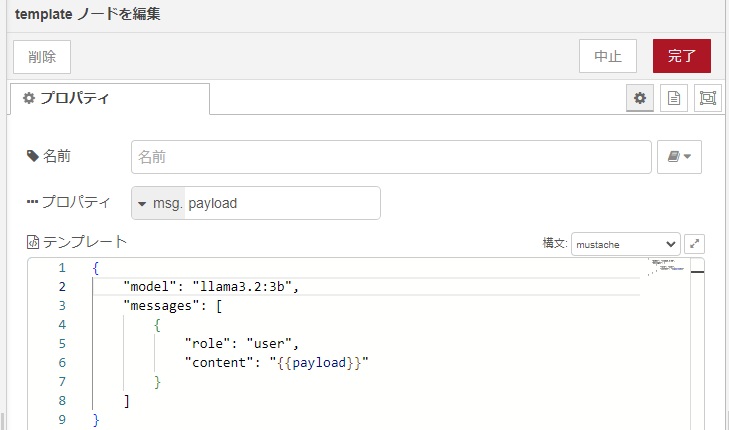
▼The LLM model used is "llama3.2:3b."
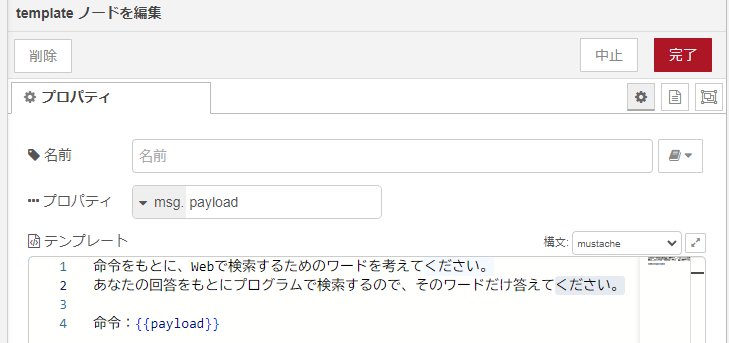
▼I also used the local LLM to generate search keywords from natural language input.
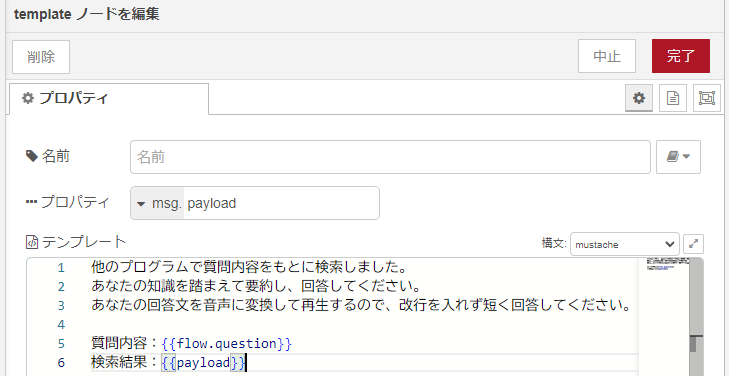
▼After searching, I instructed it to summarize the answer based on both its own knowledge and the search results.
I ran the execution.
▼The following response was returned, and the audio was played back:
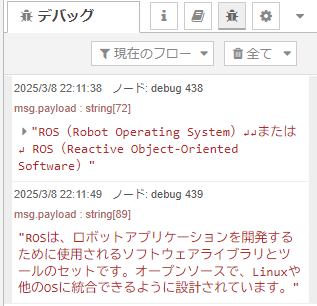
The answer provided a good explanation of ROS.
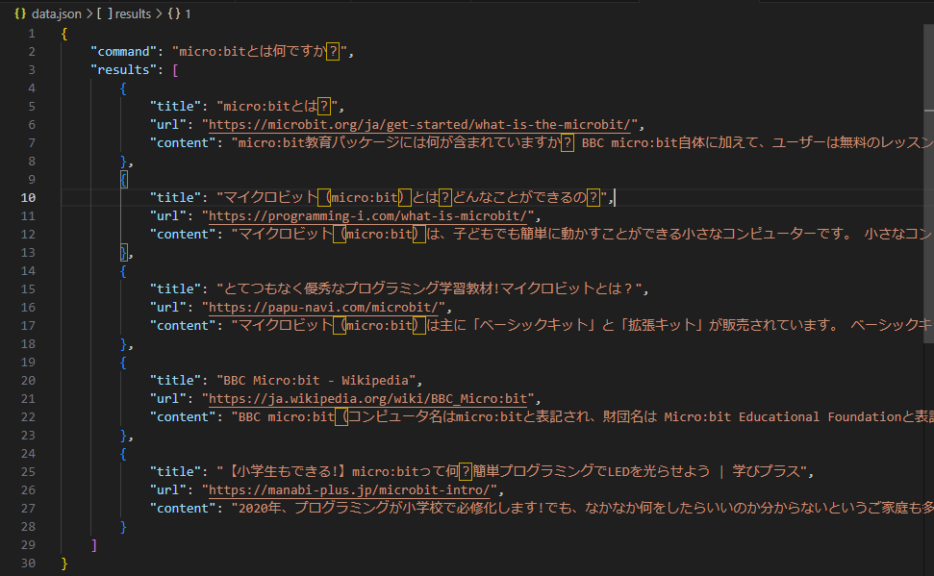
▼Here are the raw search results used:
{
    "command": "ROS(Robot Operating System)\n\nまたは\n ROS(Reactive Object-Oriented Software)",
    "results": [
        {
            "title": "ROS - Robot Operating System - ROS: Home",
            "url": "https://www.ros.org/",
            "content": "ROS - Robot Operating System. The Robot Operating System (ROS) is a set of software libraries and tools that help you build robot applications. From drivers to state-of-the-art algorithms, and with powerful developer tools, ROS has what you need for your next robotics project. And it's all open source."
        },
        {
            "title": "Why ROS? - Robot Operating System",
            "url": "https://www.ros.org/blog/why-ros/",
            "content": "ROS (Robot Operating System) is an open source software development kit for robotics applications. ... Moreover, ROS isn't exclusive, you don't need to choose between ROS or some other software stack; ROS easily integrates with your existing software to bring its tools to your problem. Multi-domain. ROS is ready for use across a wide array ..."
        },
        {
            "title": "PDF The Robot Operating System - GitHub Pages",
            "url": "https://stanfordasl.github.io/PoRA-I/aa274a_aut2122/pdfs/notes/lecture2.pdf",
            "content": "This chapter introduces the fundamentals of the Robot Operating System (ROS)1,2, a popular framework for creating robot software. Unlike what its 1 L. Joseph. Robot Operating System ... Nodes are the basic building block of ROS that enables object-oriented robot software development. Each robot component is developed as an individual ..."
        },
        {
            "title": "Robot Operating System (ROS): Working, Uses, and Benefits - Spiceworks",
            "url": "https://www.spiceworks.com/tech/artificial-intelligence/articles/what-is-robot-operating-system/",
            "content": "The robot operating system (ROS) is defined as a flexible and powerful framework designed for robotics software development. ROS Does not function as a standalone operating system but as a middleware, leveraging conventional operating systems such as Linux and furnishing developers with a suite of libraries and tools to craft sophisticated and resilient robot applications."
        },
        {
            "title": "Introduction to ROS (Robot Operating System) - GeeksforGeeks",
            "url": "https://www.geeksforgeeks.org/introduction-to-ros-robot-operating-system/",
            "content": "Robot Operating System or simply ROS is a framework which is used by hundreds of Companies and techies of various fields all across the globe in the field of Robotics and Automation. It provides a painless entry point for nonprofessionals in the field of programming Robots. So first of all What is a Robot ? A robot is any system that can perceive the environment that is its surroundings, take ..."
        }
    ]
}
▼Here is the generated audio file:
It seems possible to search using natural language even without explicitly extracting keywords.
▼I also integrated it with the "dashboard" node.
▼It results in a simple input/output screen.
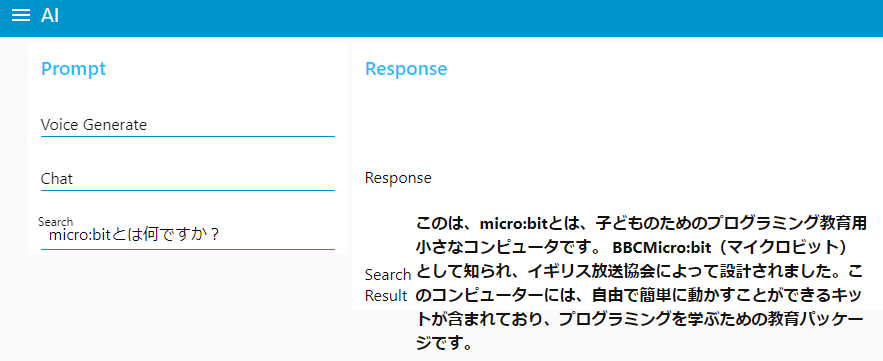
▼It looks quite similar to the results you'd get from a search engine.
Note that the local LLM's output took about 4 seconds, but the overall process felt slower because I am limiting the search speed.
While I didn't use it this time, if more detailed information is required, the next step would be to extract the content from the specific URLs.
Finally
Come to think of it, local LLMs already possess a fair amount of knowledge without searching. I think this system will be most useful for finding information that the LLM likely doesn't know yet.
I tried searching for specific personal or organizational names, but found that the local LLM struggled a bit with thinking up effective search keywords from natural language. However, it was very good at summarizing data provided in JSON format.
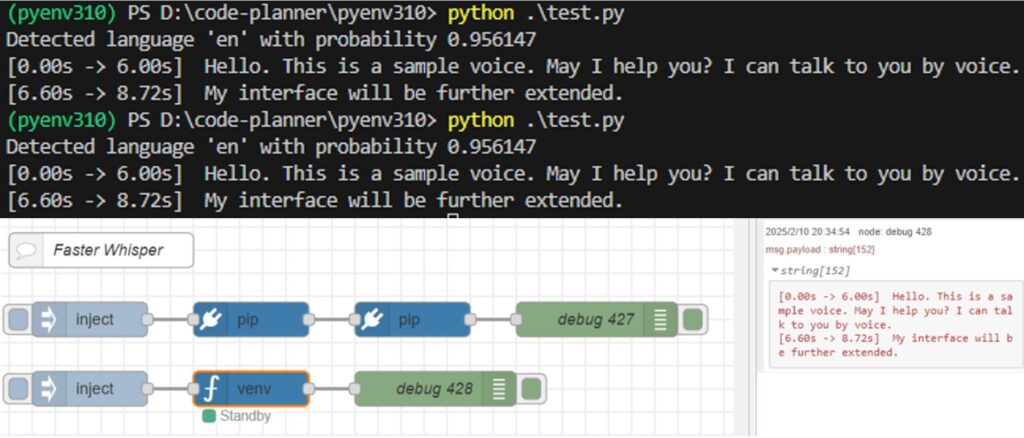
▼In this project, I put the search query in the "msg.payload" of an inject node, but this could be combined with "Speech to Text" software to handle voice commands.
Using OpensAI's Whisper (Speech Recognition, Python)
Introduction In this article, I used OpenAI's Whisper. I thought that OpenAI's service was a paid service with an API key, but the source code is available…

Trying Out Faster Whisper (Running on GPU, Python, and Node-RED)
Info This article is translated from Japanese to English. Introduction In this post, I tried performing transcription using Faster Whisper.I had tried it befor…