Trying Out Collecting Papers with Python Part 1 (arXiv, Node-RED)
 管理人
管理人Introduction
In this post, I tried collecting research papers with Python using the arXiv API.
I usually use Google Scholar when searching for papers, but since I wanted to automate the process with a program, I consulted ChatGPT and learned about the existence of the arxiv package.
After confirming a sample program with Python, I made it executable within Node-RED.
▼Previous articles are here:
Using Ollama Part 1 (Gemma2, Node-RED)
Info This article is translated from Japanese to English. Introduction This time, I tried using Ollama, a tool that lets you run LLMs locally. You can install …
 趣味的ロボット研究所
Using gTTS with Python (Text-to-Speech, Node-RED)
Introduction In this article, I used gTTS (Google Text-to-Speech) with Python. I have used VoiceVox before, but I was looking for something that could also…
Related Information
▼The arXiv page is here. I often look at it when searching for papers. When it can be displayed in HTML format, it's convenient to use Google Translate in the browser.
▼The PyPI page for arXiv is here:
https://pypi.org/project/arxiv
▼Detailed instructions on how to use the package were summarized on this page:
https://note.nkmk.me/python-arxiv-api-download-rss
Using the arXiv Package
Setting Up the Environment
The execution environment is a Windows 11 laptop with Python version 3.12.6.
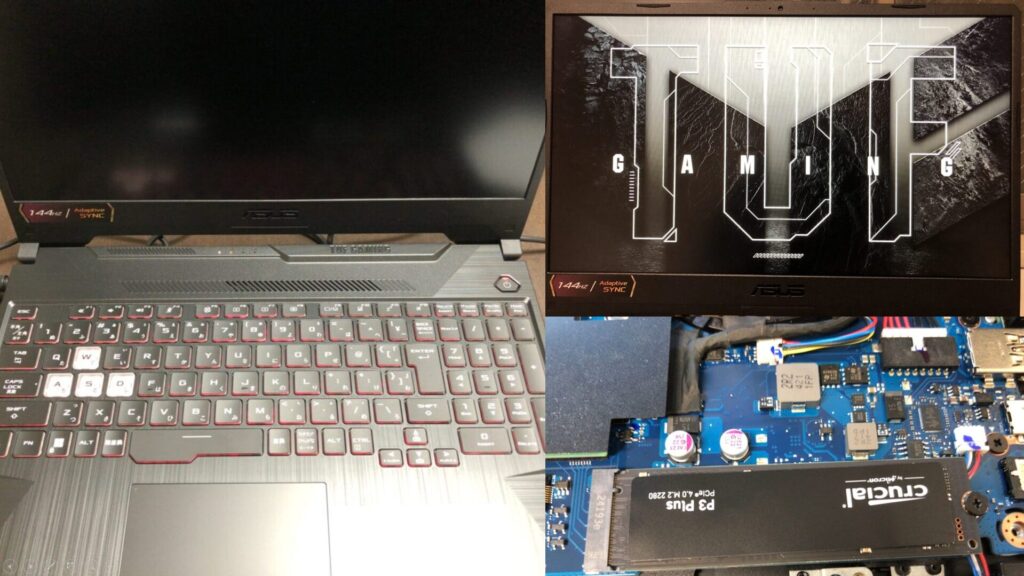
▼I am using a gaming laptop purchased for around 100,000 yen, running Windows 11.
Shopping: New Laptop and SSD Expansion (ASUS TUF Gaming A15)
Info This article is translated from Japanese to English. Introduction In this post, I’ll be talking about replacing my PC after my previous one broke down. I …

 ポチップ
ポチップ
First, create a Python virtual environment and install the package. I ran the following commands:
python -m venv pyenv
cd pyenv
.\Scripts\activate
pip install arxiv
▼For more details on Python virtual environments, please see the following article:
Create Python Virtual Environments (venv, Windows)
Info This article is translated from Japanese to English. Introduction In this post, I have summarized how to create a Python virtual environment.I was researc…

Trying the Sample Program
I tried the sample program found on the PyPI page.
# https://pypi.org/project/arxiv/

import arxiv

# Construct the default API client.
client = arxiv.Client()

# Search for the 10 most recent articles matching the keyword "quantum."
search = arxiv.Search(
  query = "quantum",
  max_results = 10,
  sort_by = arxiv.SortCriterion.SubmittedDate
)

results = client.results(search)

# `results` is a generator; you can iterate over its elements one by one...
for r in client.results(search):
  print(r.title)
# ...or exhaust it into a list. Careful: this is slow for large results sets.
all_results = list(results)
print([r.title for r in all_results])

# For advanced query syntax documentation, see the arXiv API User Manual:
# https://arxiv.org/help/api/user-manual#query_details
search = arxiv.Search(query = "au:del_maestro AND ti:checkerboard")
first_result = next(client.results(search))
print(first_result)

# Search for the paper with ID "1605.08386v1"
search_by_id = arxiv.Search(id_list=["1605.08386v1"])
# Reuse client to fetch the paper, then print its title.
first_result = next(client.results(search))
print(first_result.title)
▼The output was as follows:
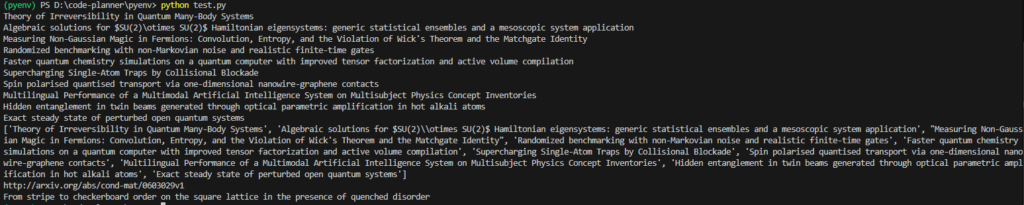
▼Briefly summarized:
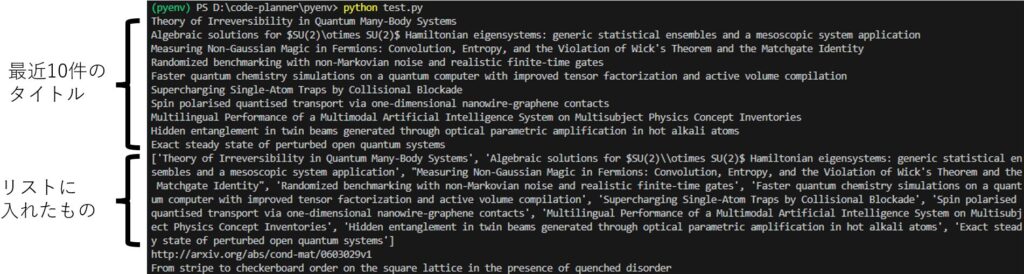
The second to last is a search using AND, and the last is a search by ID.
▼Details can be found in the following user manual:
https://info.arxiv.org/help/api/user-manual.html#query_details
I also tried the following sample program to download PDF files.
# https://pypi.org/project/arxiv/

import arxiv

paper = next(arxiv.Client().results(arxiv.Search(id_list=["1605.08386v1"])))
# Download the PDF to the PWD with a default filename.
paper.download_pdf()
# Download the PDF to the PWD with a custom filename.
paper.download_pdf(filename="downloaded-paper.pdf")
# Download the PDF to a specified directory with a custom filename.
paper.download_pdf(dirpath="./mydir", filename="downloaded-paper.pdf")
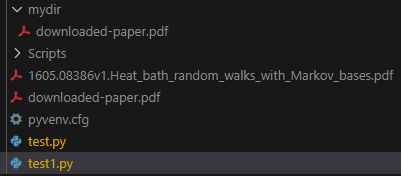
Note that while a directory is specified in the last line, a FileNotFoundError occurred if the mydir folder did not exist.
▼After execution, the PDF files were downloaded. Three files were downloaded: with the original name, the specified name, and in the specified folder.
I also tried a sample program to get results using a custom client, but since there were too many, I modified it to display the count as well.
# https://pypi.org/project/arxiv/

import arxiv
i = 0

big_slow_client = arxiv.Client(
  page_size = 1000,
  delay_seconds = 10.0,
  num_retries = 5
)

# Prints 1000 titles before needing to make another request.
for result in big_slow_client.results(arxiv.Search(query="quantum")):
  print(result.title)
  i+=1
  print(i)
▼Results were displayed 1000 at a time with a delay.
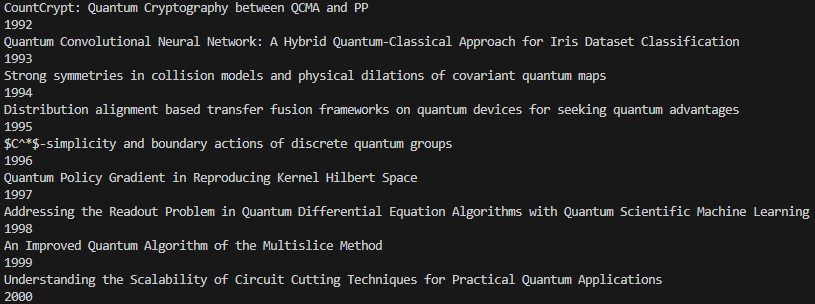
Sometimes the first display was only 100 or 200 items. After that, they were displayed 1000 at a time.
Using with Node-RED
Executing with the inject node
I used the python-venv node I developed to run Python in Node-RED.
▼I wrote about the transition of development at the end of last year.
https://qiita.com/background/items/d2e05e8d85427761a609
I created a flow to execute Python. You can install arxiv using the pip node.
▼The flow is here. The download destination folder is set in the inject node, so please change it.
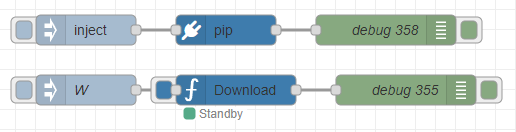
[{"id":"56d78acd29b819e8","type":"venv","z":"711edbe9464cba2a","venvconfig":"2fd1a793b1bee0bb","name":"Download","code":"import arxiv\nimport os\nimport time\nfrom datetime import datetime\n\n\ndef download_papers(paper_dir, query, wait_time=60, year_limit=2023):\n \"\"\"\n 論文を検索し、PDFをダウンロードします。\n\n Parameters:\n - paper_dir (str): 保存先フォルダ\n - query (str): 検索クエリ(複数のキーワードを空白区切りで指定)\n - wait_time (int): ダウンロード間隔(秒)\n - year_limit (int): ダウンロード対象とする論文の最小年(それ以前の論文はダウンロードしない)\n \"\"\"\n # 保存先ディレクトリを作成\n os.makedirs(paper_dir, exist_ok=True)\n print(f\"Saving papers to: {paper_dir}\")\n\n # arXivクライアントの設定\n client = arxiv.Client(page_size=10)\n\n print(f\"Searching for papers with query: '{query}'...\")\n\n # クエリを空白区切りでAND検索として扱う\n formatted_query = \" AND \".join(query.split())\n\n # クエリを実行して結果を取得\n search = arxiv.Search(\n query=formatted_query,\n sort_by=arxiv.SortCriterion.SubmittedDate\n )\n\n for result in client.results(search):\n try:\n # タイトルと提出日\n print(f\"\\nTitle: {result.title}\")\n # print(f\"Submitted: {result.updated}\")\n # print(f\"Abstract: {result.summary}\")\n\n # 提出日が指定された年よりも前かどうかを確認\n submitted_year = result.updated.year # ここで直接年を取得\n if submitted_year < year_limit:\n print(f\"Skipping {result.title} as it was submitted in {submitted_year}, which is before {year_limit}.\")\n break # 指定年より前の論文が見つかった時点で終了\n\n # ファイル名を適切にフォーマット\n sanitized_title = \"\".join(c if c.isalnum() or c in \" _-\" else \"_\" for c in result.title)\n pdf_filename = f\"{sanitized_title}.pdf\"\n pdf_paper_path = os.path.join(paper_dir, pdf_filename)\n\n # PDFが既に存在する場合はダウンロードしない\n if os.path.exists(pdf_paper_path):\n print(f\"{pdf_filename} already exists. Skipping download.\")\n continue\n\n # PDFダウンロード\n # print(f\"Downloading to: {pdf_paper_path}\")\n result.download_pdf(dirpath=paper_dir, filename=pdf_filename)\n\n time.sleep(wait_time)\n\n except Exception as e:\n print(f\"Failed to process {result.title}: {e}\")\n\n print(\"\\nDone!\")\n\n# Node-REDからの入力\nif __name__ == \"__main__\":\n # 保存先フォルダ\n paper_dir = os.path.join(msg['directory'].replace(\"\\\\\", \"/\"), 'paper')\n\n # 検索ワード\n query = msg['query']\n\n # ダウンロード間隔を設定(デフォルト60秒)\n wait_time = 10 # 固定値\n\n # ダウンロード対象とする最小年(例:2023年以降の論文)\n year_limit = 2020\n\n # 論文のダウンロード\n download_papers(paper_dir, query, wait_time, year_limit)","continuous":true,"x":1280,"y":840,"wires":[["e87751155b621fb6"]]},{"id":"8bd7561f59804d05","type":"inject","z":"711edbe9464cba2a","name":"W","props":[{"p":"directory","v":"W:\\論文","vt":"str"},{"p":"query","v":"ROS Unreal Engine","vt":"str"}],"repeat":"","crontab":"","once":false,"onceDelay":0.1,"topic":"","x":1130,"y":840,"wires":[["56d78acd29b819e8"]]},{"id":"e87751155b621fb6","type":"debug","z":"711edbe9464cba2a","name":"debug 355","active":true,"tosidebar":true,"console":false,"tostatus":false,"complete":"false","statusVal":"","statusType":"auto","x":1450,"y":840,"wires":[]},{"id":"64af3d1520034da0","type":"inject","z":"711edbe9464cba2a","name":"","props":[],"repeat":"","crontab":"","once":false,"onceDelay":0.1,"topic":"","x":1130,"y":780,"wires":[["82e599ee0edab80a"]]},{"id":"82e599ee0edab80a","type":"pip","z":"711edbe9464cba2a","venvconfig":"2fd1a793b1bee0bb","name":"","arg":"arxiv","action":"install","tail":false,"x":1270,"y":780,"wires":[["236bfae326175264"]]},{"id":"236bfae326175264","type":"debug","z":"711edbe9464cba2a","name":"debug 358","active":true,"tosidebar":true,"console":false,"tostatus":false,"complete":"false","statusVal":"","statusType":"auto","x":1430,"y":780,"wires":[]},{"id":"2fd1a793b1bee0bb","type":"venv-config","venvname":"paper","version":"3.10"}]The Python code to be executed was written by ChatGPT.
import arxiv
import os
import time
from datetime import datetime


def download_papers(paper_dir, query, wait_time=60, year_limit=2023):
    """
    論文を検索し、PDFをダウンロードします。

    Parameters:
    - paper_dir (str): 保存先フォルダ
    - query (str): 検索クエリ(複数のキーワードを空白区切りで指定)
    - wait_time (int): ダウンロード間隔(秒)
    - year_limit (int): ダウンロード対象とする論文の最小年(それ以前の論文はダウンロードしない)
    """
    # 保存先ディレクトリを作成
    os.makedirs(paper_dir, exist_ok=True)
    print(f"Saving papers to: {paper_dir}")

    # arXivクライアントの設定
    client = arxiv.Client(page_size=10)

    print(f"Searching for papers with query: '{query}'...")

    # クエリを空白区切りでAND検索として扱う
    formatted_query = " AND ".join(query.split())

    # クエリを実行して結果を取得
    search = arxiv.Search(
        query=formatted_query,
        sort_by=arxiv.SortCriterion.SubmittedDate
    )

    for result in client.results(search):
        try:
            # タイトルと提出日
            print(f"\nTitle: {result.title}")
            # print(f"Submitted: {result.updated}")
            # print(f"Abstract: {result.summary}")

            # 提出日が指定された年よりも前かどうかを確認
            submitted_year = result.updated.year  # ここで直接年を取得
            if submitted_year < year_limit:
                print(f"Skipping {result.title} as it was submitted in {submitted_year}, which is before {year_limit}.")
                break  # 指定年より前の論文が見つかった時点で終了

            # ファイル名を適切にフォーマット
            sanitized_title = "".join(c if c.isalnum() or c in " _-" else "_" for c in result.title)
            pdf_filename = f"{sanitized_title}.pdf"
            pdf_paper_path = os.path.join(paper_dir, pdf_filename)

            # PDFが既に存在する場合はダウンロードしない
            if os.path.exists(pdf_paper_path):
                print(f"{pdf_filename} already exists. Skipping download.")
                continue

            # PDFダウンロード
            # print(f"Downloading to: {pdf_paper_path}")
            result.download_pdf(dirpath=paper_dir, filename=pdf_filename)

            time.sleep(wait_time)

        except Exception as e:
            print(f"Failed to process {result.title}: {e}")

    print("\nDone!")

# Node-REDからの入力
if __name__ == "__main__":
    # 保存先フォルダ
    paper_dir = os.path.join(msg['directory'].replace("\\", "/"), 'paper')

    # 検索ワード
    query = msg['query']

    # ダウンロード間隔を設定(デフォルト10秒)
    wait_time = 10  # 固定値

    # ダウンロード対象とする最小年(例:2023年以降の論文)
    year_limit = 2020

    # 論文のダウンロード
    download_papers(paper_dir, query, wait_time, year_limit)
In the Python code, there are msg['directory'] and msg['query'] which are not defined, but this is because it accesses Node-RED's msg object. This useful feature for running Python in Node-RED was implemented by a contributor.
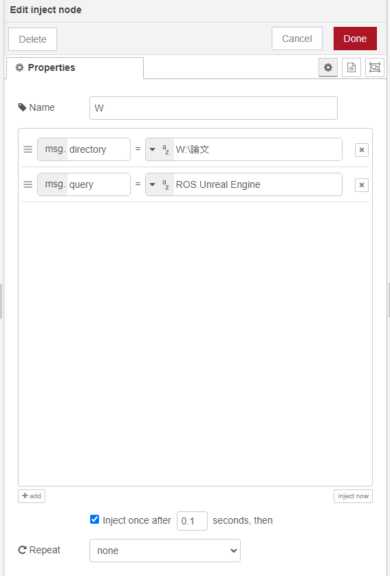
▼It is specified in the inject node as follows:
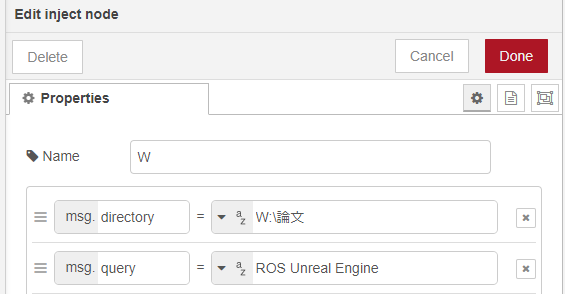
PDF files are downloaded to the paper folder within the folder specified by msg.directory.
I actually ran it.
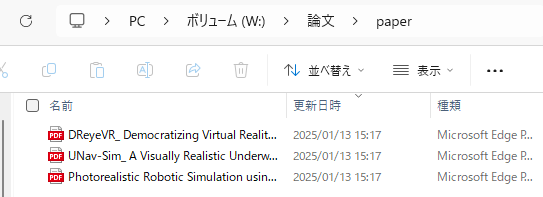
▼Paper PDFs were downloaded!
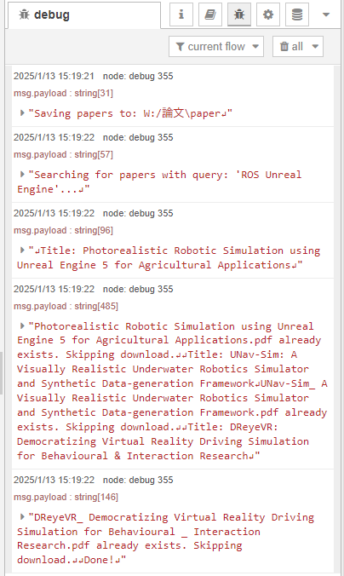
▼It skips if already downloaded.
Combining with the dashboard node
During the New Year holidays, I updated the python-venv node so that it can access not only the msg object but also the flow and global objects.
Using this feature, I used the text input node from the dashboard node to input queries and directories to download PDF files.
▼The overall flow is here. The search keyword entered in the dashboard is assigned to the flow object.

[{"id":"60da293526020a2c","type":"venv","z":"711edbe9464cba2a","venvconfig":"2fd1a793b1bee0bb","name":"Download","code":"import arxiv\nimport os\nimport time\nfrom datetime import datetime\n\n\ndef download_papers(paper_dir, query, wait_time=60, year_limit=2023):\n \"\"\"\n 論文を検索し、PDFをダウンロードします。\n\n Parameters:\n - paper_dir (str): 保存先フォルダ\n - query (str): 検索クエリ(複数のキーワードを空白区切りで指定)\n - wait_time (int): ダウンロード間隔(秒)\n - year_limit (int): ダウンロード対象とする論文の最小年(それ以前の論文はダウンロードしない)\n \"\"\"\n # 保存先ディレクトリを作成\n os.makedirs(paper_dir, exist_ok=True)\n print(f\"Saving papers to: {paper_dir}\")\n\n # arXivクライアントの設定\n client = arxiv.Client(page_size=10)\n\n print(f\"Searching for papers with query: '{query}'...\")\n\n # クエリを空白区切りでAND検索として扱う\n formatted_query = \" AND \".join(query.split())\n\n # クエリを実行して結果を取得\n search = arxiv.Search(\n query=formatted_query,\n sort_by=arxiv.SortCriterion.SubmittedDate\n )\n\n for result in client.results(search):\n try:\n # タイトルと提出日\n print(f\"\\nTitle: {result.title}\")\n # print(f\"Submitted: {result.updated}\")\n # print(f\"Abstract: {result.summary}\")\n\n # 提出日が指定された年よりも前かどうかを確認\n submitted_year = result.updated.year # ここで直接年を取得\n if submitted_year < year_limit:\n print(f\"Skipping {result.title} as it was submitted in {submitted_year}, which is before {year_limit}.\")\n break # 指定年より前の論文が見つかった時点で終了\n\n # ファイル名を適切にフォーマット\n sanitized_title = \"\".join(c if c.isalnum() or c in \" _-\" else \"_\" for c in result.title)\n pdf_filename = f\"{sanitized_title}.pdf\"\n pdf_paper_path = os.path.join(paper_dir, pdf_filename)\n\n # PDFが既に存在する場合はダウンロードしない\n if os.path.exists(pdf_paper_path):\n print(f\"{pdf_filename} already exists. Skipping download.\")\n continue\n\n # PDFダウンロード\n # print(f\"Downloading to: {pdf_paper_path}\")\n result.download_pdf(dirpath=paper_dir, filename=pdf_filename)\n\n time.sleep(wait_time)\n\n except Exception as e:\n print(f\"Failed to process {result.title}: {e}\")\n\n print(\"\\nDone!\")\n\n# Node-REDからの入力\nif __name__ == \"__main__\":\n # 保存先フォルダ\n paper_dir = os.path.join(node['flow']['directory'].replace(\"\\\\\", \"/\"), 'paper')\n\n # 検索ワード\n query = node['flow']['query']\n\n # ダウンロード間隔を設定(デフォルト60秒)\n wait_time = 10 # 固定値\n\n # ダウンロード対象とする最小年(例:2023年以降の論文)\n year_limit = 2020\n\n # 論文のダウンロード\n download_papers(paper_dir, query, wait_time, year_limit)","continuous":true,"x":1400,"y":580,"wires":[["991894f0041bde39"]]},{"id":"991894f0041bde39","type":"debug","z":"711edbe9464cba2a","name":"debug 355","active":true,"tosidebar":true,"console":false,"tostatus":false,"complete":"false","statusVal":"","statusType":"auto","x":1570,"y":580,"wires":[]},{"id":"17a39cba18b56f4a","type":"ui_text_input","z":"711edbe9464cba2a","name":"","label":"Query","tooltip":"","group":"3c0113e44b7c7681","order":2,"width":0,"height":0,"passthru":true,"mode":"text","delay":"0","topic":"topic","sendOnBlur":true,"className":"","topicType":"msg","x":1210,"y":500,"wires":[["5e8f6e1392be952c"]]},{"id":"5e8f6e1392be952c","type":"change","z":"711edbe9464cba2a","name":"","rules":[{"t":"set","p":"query","pt":"flow","to":"payload","tot":"msg"}],"action":"","property":"","from":"","to":"","reg":false,"x":1380,"y":500,"wires":[[]]},{"id":"09dbdd1d30623cf4","type":"ui_text_input","z":"711edbe9464cba2a","name":"","label":"Directory","tooltip":"","group":"3c0113e44b7c7681","order":1,"width":0,"height":0,"passthru":true,"mode":"text","delay":"0","topic":"topic","sendOnBlur":true,"className":"","topicType":"msg","x":1220,"y":540,"wires":[["f89c8b94065c0f92"]]},{"id":"f89c8b94065c0f92","type":"change","z":"711edbe9464cba2a","name":"","rules":[{"t":"set","p":"directory","pt":"flow","to":"payload","tot":"msg"}],"action":"","property":"","from":"","to":"","reg":false,"x":1410,"y":540,"wires":[[]]},{"id":"09bea2464adcad69","type":"ui_button","z":"711edbe9464cba2a","name":"","group":"3c0113e44b7c7681","order":3,"width":0,"height":0,"passthru":false,"label":"Search","tooltip":"","color":"","bgcolor":"","className":"","icon":"","payload":"","payloadType":"str","topic":"topic","topicType":"msg","x":1220,"y":580,"wires":[["60da293526020a2c"]]},{"id":"a2ca29c9855d8533","type":"change","z":"711edbe9464cba2a","name":"","rules":[{"t":"set","p":"payload","pt":"msg","to":"query","tot":"msg"}],"action":"","property":"","from":"","to":"","reg":false,"x":1040,"y":500,"wires":[["17a39cba18b56f4a"]]},{"id":"510bb51c560178d8","type":"change","z":"711edbe9464cba2a","name":"","rules":[{"t":"set","p":"payload","pt":"msg","to":"directory","tot":"msg"}],"action":"","property":"","from":"","to":"","reg":false,"x":1040,"y":540,"wires":[["09dbdd1d30623cf4"]]},{"id":"f2915bc04c18cd63","type":"inject","z":"711edbe9464cba2a","name":"W","props":[{"p":"directory","v":"W:\\論文","vt":"str"},{"p":"query","v":"ROS Unreal Engine","vt":"str"}],"repeat":"","crontab":"","once":true,"onceDelay":0.1,"topic":"","x":870,"y":500,"wires":[["a2ca29c9855d8533","510bb51c560178d8"]]},{"id":"2fd1a793b1bee0bb","type":"venv-config","venvname":"paper","version":"3.10"},{"id":"3c0113e44b7c7681","type":"ui_group","name":"arXiv","tab":"4fbb1075cf58a732","order":1,"disp":true,"width":"6","collapse":false,"className":""},{"id":"4fbb1075cf58a732","type":"ui_tab","name":"Paper","icon":"dashboard","disabled":false,"hidden":false}]The Python code is below. It accesses the flow object via node['flow']['query'] and node['flow']['directory']. I simply changed the parts that previously received the msg object.
import arxiv
import os
import time
from datetime import datetime


def download_papers(paper_dir, query, wait_time=60, year_limit=2023):
    """
    論文を検索し、PDFをダウンロードします。

    Parameters:
    - paper_dir (str): 保存先フォルダ
    - query (str): 検索クエリ(複数のキーワードを空白区切りで指定)
    - wait_time (int): ダウンロード間隔(秒)
    - year_limit (int): ダウンロード対象とする論文の最小年(それ以前の論文はダウンロードしない)
    """
    # 保存先ディレクトリを作成
    os.makedirs(paper_dir, exist_ok=True)
    print(f"Saving papers to: {paper_dir}")

    # arXivクライアントの設定
    client = arxiv.Client(page_size=10)

    print(f"Searching for papers with query: '{query}'...")

    # クエリを空白区切りでAND検索として扱う
    formatted_query = " AND ".join(query.split())

    # クエリを実行して結果を取得
    search = arxiv.Search(
        query=formatted_query,
        sort_by=arxiv.SortCriterion.SubmittedDate
    )

    for result in client.results(search):
        try:
            # タイトルと提出日
            print(f"\nTitle: {result.title}")
            # print(f"Submitted: {result.updated}")
            # print(f"Abstract: {result.summary}")

            # 提出日が指定された年よりも前かどうかを確認
            submitted_year = result.updated.year  # ここで直接年を取得
            if submitted_year < year_limit:
                print(f"Skipping {result.title} as it was submitted in {submitted_year}, which is before {year_limit}.")
                break  # 指定年より前の論文が見つかった時点で終了

            # ファイル名を適切にフォーマット
            sanitized_title = "".join(c if c.isalnum() or c in " _-" else "_" for c in result.title)
            pdf_filename = f"{sanitized_title}.pdf"
            pdf_paper_path = os.path.join(paper_dir, pdf_filename)

            # PDFが既に存在する場合はダウンロードしない
            if os.path.exists(pdf_paper_path):
                print(f"{pdf_filename} already exists. Skipping download.")
                continue

            # PDFダウンロード
            # print(f"Downloading to: {pdf_paper_path}")
            result.download_pdf(dirpath=paper_dir, filename=pdf_filename)

            time.sleep(wait_time)

        except Exception as e:
            print(f"Failed to process {result.title}: {e}")

    print("\nDone!")

# Node-REDからの入力
if __name__ == "__main__":
    # 保存先フォルダ
    paper_dir = os.path.join(node['flow']['directory'].replace("\\", "/"), 'paper')

    # 検索ワード
    query = node['flow']['query']

    # ダウンロード間隔を設定(デフォルト10秒)
    wait_time = 10  # 固定値

    # ダウンロード対象とする最小年(例:2023年以降の論文)
    year_limit = 2020

    # 論文のダウンロード
    download_papers(paper_dir, query, wait_time, year_limit)
▼The inject node at the beginning is set to execute when Node-RED starts. Its value is passed as the initial value for the text input node.
I actually ran it.
▼The dashboard screen is here. After specifying the Directory and Query, clicking SEARCH started the download.
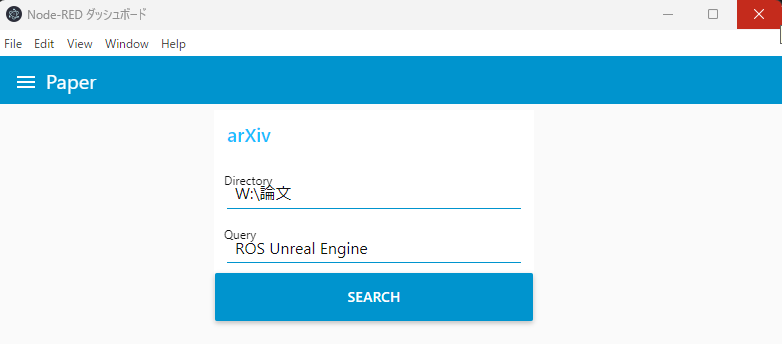
Even for more detailed condition specifications, it seems easy to create a screen by combining it with the dashboard node.
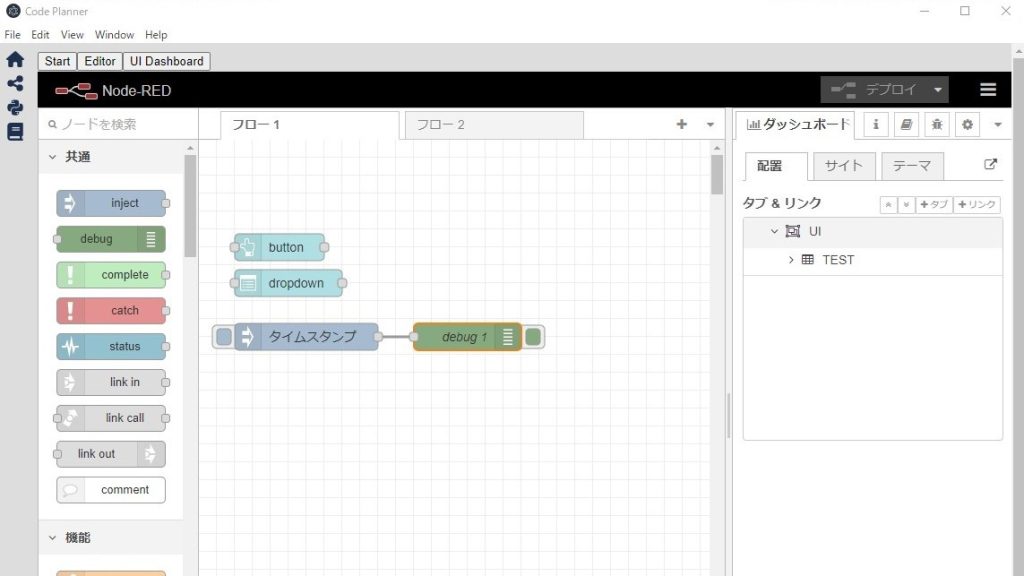
▼By the way, I use Node-RED embedded in Electron. It is displayed as an Electron window rather than in a browser.
Trying Out Embedding Node-RED into Applications Part 1 (Electron, Express)
Info This article is translated from Japanese to English. Introduction In this post, I tried embedding Node-RED into an application I am creating with Electron…
Finally
In the first place, I was collecting a large number of papers because I wanted to read them for my graduation thesis. Although not written here, I followed this up with processing to extract text from the PDF files, translate it, and summarize it using a local LLM. I plan to gradually summarize these elementary technologies.
This time I set the Query to "ROS" and "Unreal Engine," but there aren't many papers. Since I am combining those two in my research, I want to search for more prior research.