Object Detection with YOLO Part 1 (Ultralytics, YOLO11)
 管理人
管理人Introduction
In this post, I tried using YOLO, a well-known object detection algorithm.
Since this is my first time working with object detection, I started with something easy to execute while doing some research. I haven't really mounted cameras on my robots before, so I’d like to incorporate this into my future designs.
I began researching with the goal of detecting tomatoes from images, and I found that the latest version is already up to v11. With such frequent version updates, I do get a bit worried about package dependencies.
▼Previous articles are here:
Raspberry Pi Zero 2を使ってみる その2(カメラ、Thonny、Node-RED)
はじめに 今回はRaspberry Pi Zero 2にカメラを取り付けてみました。 少し古い書籍を読みながら試していたときは、コマンドを入力してもエラーが出て撮影できないこと…
 趣味的ロボット研究所
Unreal Engine 5を使ってみる その10(Scaniverse、点群データの取り込み)
はじめに 今回はiPhone 15 ProでScaniverseというアプリを使って3Dスキャンしたデータを、Unreal Engine 5(UE5)に取り込んでみました。 データを取り込むにあたって…
Related Information
Overview
YOLO stands for "You Only Look Once," and it allows for high-speed object detection from images.
▼Although it only goes up to YOLO v7, this article provides a clear summary of YOLO's evolution. There are projects derived from YOLO, and the primary development entities seem to have changed over time.
【YOLO】各バージョンの違いを簡単にまとめてみた【物体検出アルゴリズム】 #初心者 - Qiita
The latest YOLO11 is developed by a company called Ultralytics.
▼Ultralytics page is here. Demos are also available.
https://www.ultralytics.com/yolo
▼The page regarding the latest YOLO11 is here. It seems speed and accuracy have improved significantly.
YOLO11 🚀 NEW - Ultralytics YOLO Docs
There is an app called "Ultralytics YOLO" that allows you to try YOLO on your smartphone.
▼I tried it on my iPhone 8, but the app crashed when using a large model, likely due to heavy processing. It seems the iPhone 8 might finally be getting too old…
https://apps.apple.com/jp/app/ultralytics-yolo/id1452689527
Datasets
Objects are detected based on a dataset; if there isn't one that fits your specific purpose, you’ll need to create it.
▼Ultralytics has a page regarding datasets. There are datasets for African animals, drones, and more.
https://docs.ultralytics.com/ja/datasets
▼I found a dataset that looks useful for the agricultural field.
https://blog.roboflow.com/top-agriculture-datasets-computer-vision
▼This is a tomato dataset on Kaggle.
https://www.kaggle.com/datasets/andrewmvd/tomato-detection
▼I found an article about creating a tomato detector! I definitely want to use this as a reference.
https://farml1.com/tomato_yolov5
Setting Up the Environment
For this setup, I am using a Windows 10 laptop.
I had previously tried setting up a YOLO v10 environment while looking at the GitHub repository, but I encountered errors due to package version conflicts when running samples.
▼It seemed like packages requiring Python 3.9+ and 3.10+ were mixed together.


This time, when creating the Python virtual environment, I specifically designated Python version 3.9.
▼Information on Python virtual environments is here:
Create Python Virtual Environments (venv, Windows)
Info This article is translated from Japanese to English. Introduction In this post, I have summarized how to create a Python virtual environment.I was researc…
I used the following commands to create and activate the virtual environment:
py -3.9 -m venv yolo39
cd yolo39
.\Scripts\activate
Next, I installed and executed the Ultralytics package.
▼The Ultralytics repository is here:
https://github.com/ultralytics/ultralytics
Install ultralytics into the virtual environment:
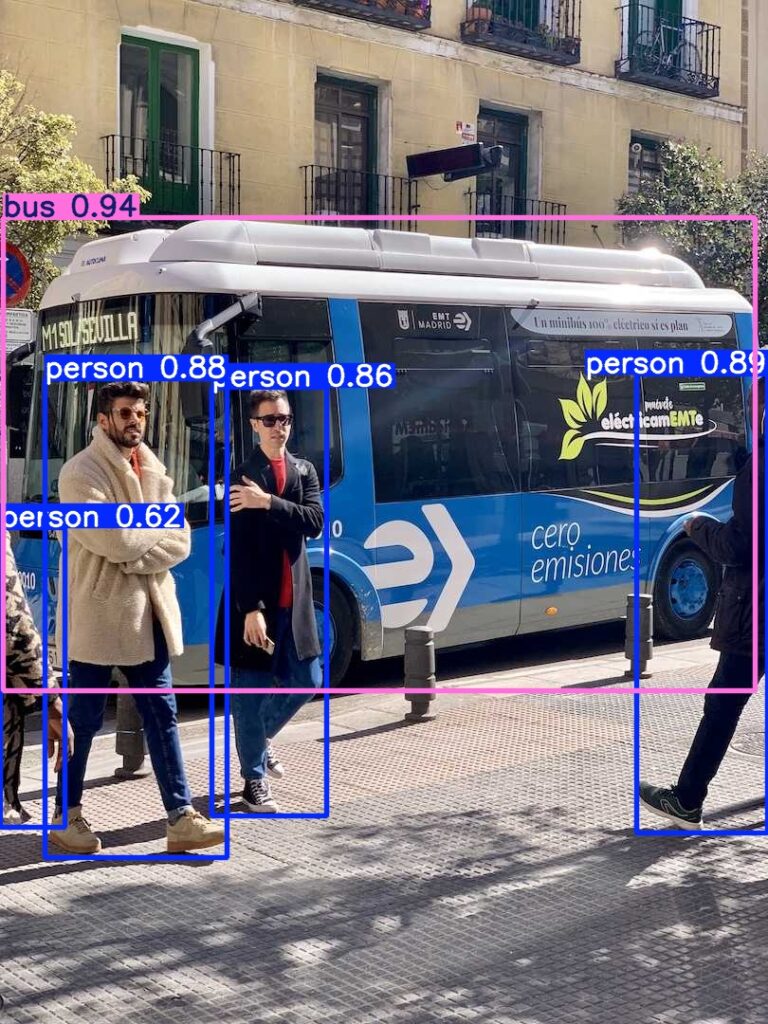
pip install ultralyticsThat’s all you need to install. Running the following command saved an image with the objects detected.
yolo predict model=yolo11n.pt source='https://ultralytics.com/images/bus.jpg'▼The processed image was saved as shown below.
Trying Real-time Object Detection
When actually mounting this on a robot, you need to process camera data in real-time. I tried running a simple demo.
▼I referred to this page:
https://docs.ultralytics.com/ja/guides/streamlit-live-inference
Just run the following command:
yolo streamlit-predictThe app launched, and I accessed the URL displayed in the command prompt to see the interface.
▼From the left sidebar, you can select the model, target objects, and start the detection.
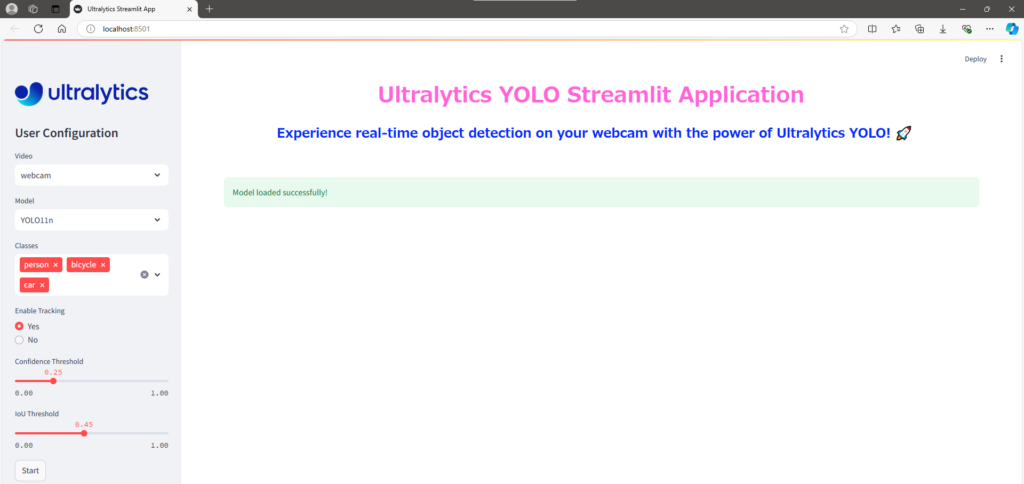
I selected "person," "keyboard," and "book" as targets and performed the detection.
▼This is YOLO11s.
▼This is YOLO11n. The FPS is higher than YOLO11s.
While fine parameters can be adjusted, I felt it detected objects quite well. It was even able to detect TVs or keyboards when only half of them were in the frame.
Finally
I’ve heard that when actually mounting this on a robot, you use it by matching the coordinates of the detected object with the depth camera coordinates to measure the distance to the object. Next, I plan to work on obtaining coordinates and enabling communication.
I also need to learn how to create my own datasets for future projects. I’ve heard that color information can vary significantly depending on ambient light, which is something to keep in mind.